.jpg.85a8ec5e3c3b929584558a6bc5bc2a1d.jpg)
Chris James
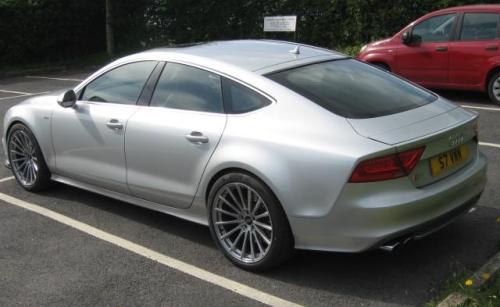
Bought the S7 last year and spent months and months and them some more, trying to upgrade its 19" alloys. The issue I had was finding a design I liked with an offset that wouldn't extend the alloys beyond the arches, but that would give enough clearance to avoid touching the rather large, but standard, front brake calipers.
During the months of searching I bought one set that the seller assured me would fit an S7, but in reality when offered up to the car, wouldn't clear the calipers. They were returned for a full refund - ok in the end, but a lot of hassle! This happened twice, but like I say ok in the end.
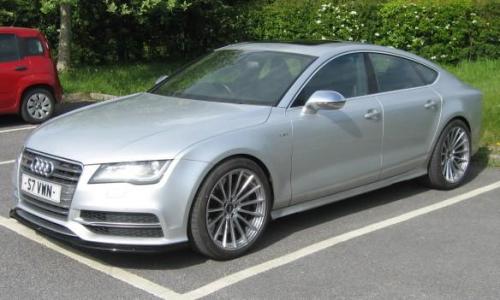
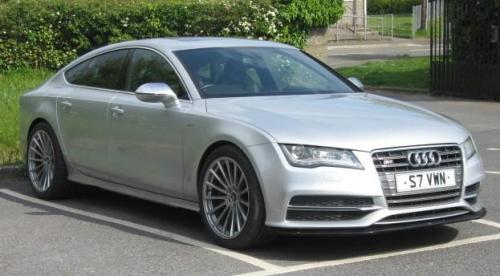
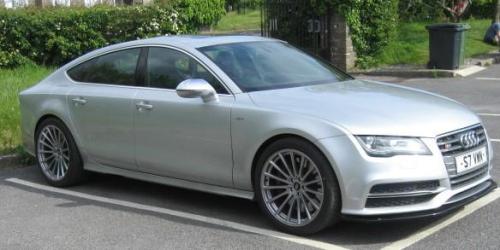
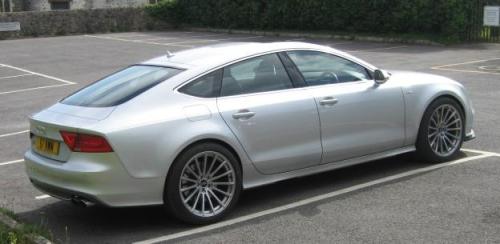
Eventually I found a set of 20" multi-spoke alloys to which I fitted 275/35/20 tyres and this is the result - hope you approve?
8 images
-
By Chris James
-
By Chris James
-
By Chris James
-
By Chris James
-
By Chris James
-
By Chris James
-
By Chris James
-
By Chris James
.jpg.9b85115a4cba46ae7b1fe9539cf54430.jpg)
.jpg.ace7be67b53d7308fc9d6bb70be905ed.jpg)
.jpg.008dd2632b6eb807bfb01070ed7445ba.jpg)