




Welcome to the Audi Owners' Club - An Independent community!
Membership is completely free, and our community is built by enthusiasts, for enthusiasts. We’re a proudly independent, non-official club, so all the help and opinions you’ll find here come directly from members with real experience of Audi ownership.
Join the club now!
Popular Topics This Week
-
Hi guys. Was picking up my brand new SQ5 first edition today from Poole Audi. While going through the handover a warning msg kept coming up saying “Audio for outside (?) mode not working see dealer.” After finishing the handover the Sales guy refers it to Tech guy who informs me after looking at it he sorted it and all is fine. Wife and I decided to go for some food close by because we live in Weymouth about an hour away. On way there msg flashed up again. When we were leaving restaurant,msg fla
-
Hello - The Lane Assist feature defaults to ON every time you start the car. It's really really annoying and just makes you cross having to turn it off every time you use the car. Audi support say you can't do it as it is a safety feature - but on my A6 it remains off unless required. Is it possible using IID Tool etc. to have this feature default to off on the A3? There are loads of annoying things with the A3 which simply worked much better on previous Mercedes - but I'm sure there mu
-
Hi all, Ive got an rs7 c8 and recently a few days ago i noticed my steering feeling abnormally light. Even when changing into dynamic/RS mode it feels the same and doesnt stiffen up like it used to when I bought it a couple weeks back. Feels like Im losing control at higher speeds and just feels abnormal If im being honest. Wondering if anyone has experienced something like this before. I did go to my local audi and raised the concern they checked the shocks suspension alignment etc and said the
-
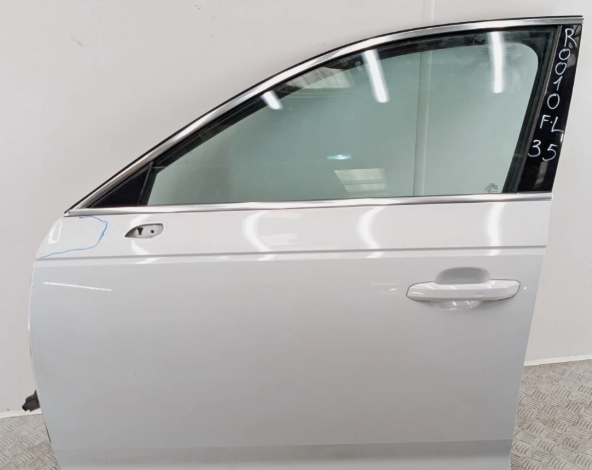
Hi all I need to replace the drivers side rear door on my 2024 B9.5 Saloon after my wife lost a fight with a brick wall whilst driving it… Couple of questions - can I use a door from an Avant or are they different? Seeing conflicting information online… I think the part numbers are the same but want to confirm before purchasing! And I don’t trust ChatGPT enough! Also, would a B9 door fit without issue as well? Found quite a few online in the right colour (Daytona Grey) but most are either from
-
Hi guys, great forum btw. My names Jay and live in Knaresborough North Yorkshire. On Saturday I'm off to see about an A7. Would you guys be kind enough to list some points I should look at or ask? The model is....2015 audi a7 s-line quattro 3.0 diesel with stage 1 Thank you in advance





Community Live Now
-
Hi I am sure all the Herberts that run mapping adverts on Facebook are totally upfront on their tax declarations, it won't affect the modified car scene insomuch if they stick to exhaust systems that work in line with emissions equipment that is already fitted to the car, it won't be stopping super wide wheels or lowering and suspension its aimed at the emissions, the manufacturers manage models that fit the criteria and positively fly along so the simple equation is if you save your money then buy fast you have got a better deal, the flip side of that is the ones that do save up and buy fast seem to end up on sites like this because they don't factor in running costs or servicing or sudden failure of key components, never going to be a winner is it. Steve.
-
Still no success as yet. I’m trying different people but no solution so far.
-
This is interesting I hadnt heard about this untill now. The issue will be the modified car parts scene will nosedive and I believe this brings in a good amount to the tax man every year through vat etc. I'm not condoneing illegal mods by the way, just stating the impact on last revenue from vat and then income tax/corporation tax etc if businesses close down.
-
Lovely looking car. I'd definitely recommend getting it to an auto electrician to resolve this. I appreciate it's out of warranty from the dealer you bought it from but assuming it's a jap car import specialist it might be worth seeing if hey can resolve it. Just in case they need to speak to any specific contacts in Japan if it's a Japan only version. The rattling could be the under tray coming loose or a heat shield coming loose.
-
Hi - my A6 C8 2.0 diesel has started throwing a “Drive system fault: contact workshop” error - it’s happened around four times in the last week. First three when using cruise control - which is knocked off and can’t be used once the error appears. The latest time error appeared when in normal driving. After stopping and restarting the error clears. Doesn’t appear on every drive - sometimes more than 60 miles in. Stop start and intelligent coasting all appear normal. In every other respect the car seems to be driving normally. i’m away from home for the next few days with the car and will take to main dealer when i return. Thought I would see if anyone had any ideas/advice? Thanks


The Digestive
-
"The Digestive" Weekly roundup 21st June - 12th July 2026 In this edition of our weekly digest newsletter, we’ll delve into some of the fascinating discussions held over the past few weeks on our forums. From repairs to your favourite models, the club continues to provide a wealth of knowledge. A hot topic has emerged surrounding the Audi A4 (B9), where member squish14, seeking help with a blocked heater core replacement, received a trove of advice. Fellow members discussed the challenges of acc


Albums
-
- 35 images
By AOC Admin -
- 8 images
- 1 comment
By Bernard Courts -
- 8 images
- 1 comment
By Rwalsh -
- 4 images
- 1 comment
- 1 image comment
By wheelnutman -
- 5 images
By Delios -
- 35 images
By Felixwiskers -
- 5 images
By Bennyboi -
- 19 images
By Scott G555 -
- 3 images
By Jake_a38v
Member Statistics
- 48,000 Total Members
- 2,913 Most Online
-
Robert.drag Newest Member ·
