
Brantome
Members
-
Joined
-
Last visited
Everything posted by Brantome
-
Hi, only just saw this - didn’t get my usual email prompts. I’d forgotten about that helper app. See this link to download and install it Helper app After you do that, just go to the Templates page (which really is a list of free “ready made apps”) from the bottom menu bar in the Macrodroid app and search for “Car Bluetooth enables hotspot”, select the search result and choose add macro. Then select and edit it by tapping on “device detected” and “device disconnected” in turn , choosing Configure then your Bluetooth connection name from the dropdown list. That should be you all set up.
-
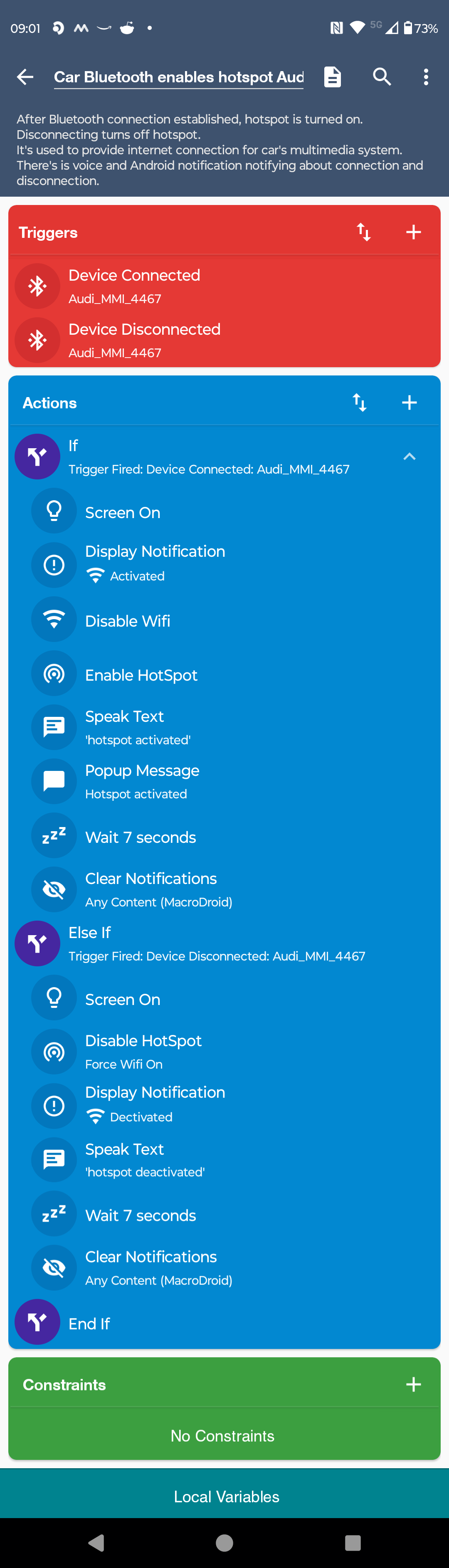
Here’s mine - I did try setting up my own but then found “Car Bluetooth enables hotspot” under Templates and modified it for my Bluetooth name etc. It works well, although on some occasions it doesn’t connect and I clock up a few mb on Cubic. Hopefully when Cubic runs out, it’ll always connect to my phone. Note: I should say that you’ll need to have paired your phone with the car’s Bluetooth first for this to work so that you get the Bluetooth name. After that, your phone should detect the pairing and connect when it’s in range.
-
Thanks for that. Yeah it’s a bind not being able to easily select it in settings - a “use car/phone Wi-fi” toggle would be handy. What I’ve done on my Android phone is to install the Macrodroid app and use a macro that automatically turns on my phone’s WiFi hotspot (and turns off its Wi-fi) when it detects it’s connected to the car’s Bluetooth, and when I get out of the car, it automatically kills the phone’s hotspot and turns Wi-fi back on. That works reasonably well although I do need to be a little patient when I get into the car to ensure that process has worked - sometimes it’ll not detect the phone’s hotspot quickly enough and use the Audi cubic data plan instead. It’ll be interesting to see how it reacts when it doesn’t have that car data plan to fall back on. Cheers
-
As of last week, I have a new Audi A3 sportback with the tech pack which replaced my trusty old 2008 Audi A4. In the A4, I used an Echo Auto device to use Alexa and related music services (as well as maps) which used my Android phone’s ample data plan for music playback thru the car audio. Indeed, inbuilt Alexa support on the A3 was one of the factors that drew me to the A3. I’m currently using the complimentary 25GB cubic telecom plan for Alexa and Android Auto in the A3 but would much prefer using the data plan on my Motorola Edge 30 Fusion which more than sufficed on the A4 for Alexa use. I’d rather not have to use a cabled connection, nor have a WiFi hotspot on my phone that I might need to enable/disable to each time I use the car. I have found a reference to an Audi TSB (ref. 91 21 80 2062466/1 March 10, 2021) where it refers to a means of attaching an iPhone for Carplay and using its data plan, although of course there’s no mention of Alexa use in that context. So, is there a way I can connect my Android phone and use its data plan to provide support for Alexa and related services, as well as Android Auto or indeed any other in-car service that requires internet access? Thanks