Skip to content
View in the app

A better way to browse. Learn more.

Audi Owners Club (UK)

A full-screen app on your home screen with push notifications, badges and more.

To install this app on iOS and iPadOS
  1. Tap the Share icon in Safari
  2. Scroll the menu and tap Add to Home Screen.
  3. Tap Add in the top-right corner.
To install this app on Android
  1. Tap the 3-dot menu (⋮) in the top-right corner of the browser.
  2. Tap Add to Home screen or Install app.
  3. Confirm by tapping Install.


EXEMAN

Members
  • Joined

  • Last visited

  1. EXEMAN replied to EXEMAN's topic in Audi A4 (B6) Forum
    Hi Steve , thanks for response, of course you're right it would be much better to get a set from a B6 Avant but there's not a good cream set at the moment . Ebay was my 1st port of call , followed by Gumtree followed by "breaking A4" on ebay , then you start looking to see what else would fit fairly easily .perhaps I can find a b6 Passat locally to have a close check but otherwise might be best to test my patience .I'll let you know what I end up with , thanks again Richard
  2. EXEMAN posted a topic in Audi A4 (B6) Forum
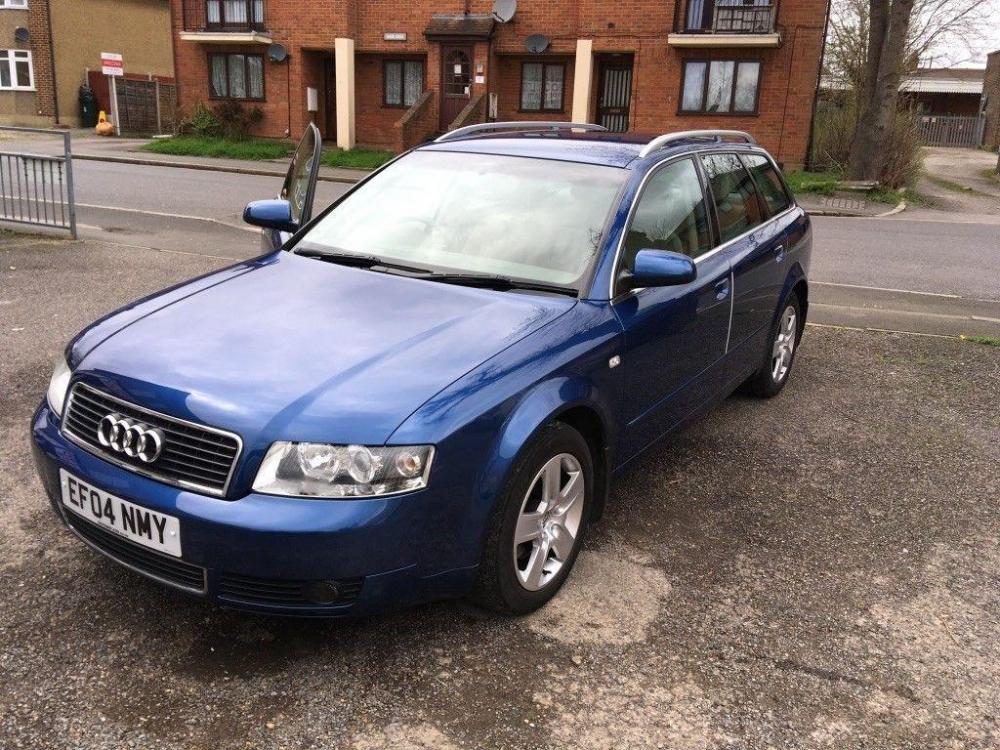
    Hi Guys , at last found a well cared for B6 Avant , great body but the cloth seats are stained and showing their age so liking cream leather I've seen a VW Passat B6 set come up at a reasonable price and was hoping the Forum could advise if they're likely to fit ? as they're not local , thanking in advance .Richard


Background Picker
Customize Layout

Account

Navigation

Search

Search

Configure browser push notifications

Chrome (Android)
  1. Tap the lock icon next to the address bar.
  2. Tap Permissions → Notifications.
  3. Adjust your preference.
Chrome (Desktop)
  1. Click the padlock icon in the address bar.
  2. Select Site settings.
  3. Find Notifications and adjust your preference.