Skip to content
View in the app

A better way to browse. Learn more.

Audi Owners Club (UK)

A full-screen app on your home screen with push notifications, badges and more.

To install this app on iOS and iPadOS
  1. Tap the Share icon in Safari
  2. Scroll the menu and tap Add to Home Screen.
  3. Tap Add in the top-right corner.
To install this app on Android
  1. Tap the 3-dot menu (⋮) in the top-right corner of the browser.
  2. Tap Add to Home screen or Install app.
  3. Confirm by tapping Install.


Dynamo86

Members
  • Joined

  • Last visited

  1. Ye thanks. I'm also thinking I've done something wrong, but then I see the below note from Ross website and wonder if it's because of that: Note: Depending on the Byte 18 coding, this may result in all of the parking lights illuminating.
  2. Yes they do, I only want the fogs on
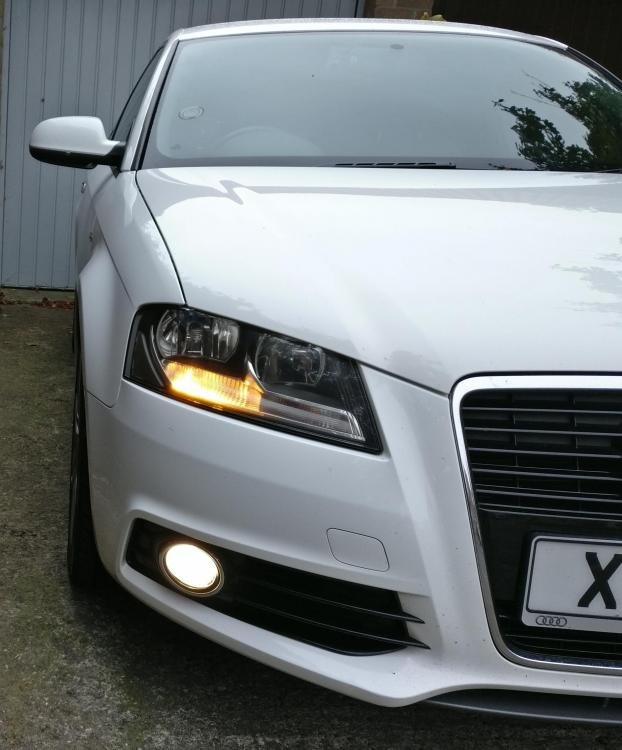
  3. Hi Steve, Thanks for the response! I have VAGCOM lead and I want to keep the fog lights as the DRL instead of the headlight, I'm trying to turn them off completely as DRL's but I'm unsure how to. I want to keep the fogs on as I think they look much better as DRLs.
  4. Hi, I've configured the car so that the fog lights are DRL instead of the headlight DRL's. The problem is that the original headlight DRL's are still on and look horrible because their yellow! Anyone know if it's possible to turn them off as DRL's? Cheers.


Background Picker
Customize Layout

Account

Navigation

Search

Search

Configure browser push notifications

Chrome (Android)
  1. Tap the lock icon next to the address bar.
  2. Tap Permissions → Notifications.
  3. Adjust your preference.
Chrome (Desktop)
  1. Click the padlock icon in the address bar.
  2. Select Site settings.
  3. Find Notifications and adjust your preference.