Skip to content
View in the app

A better way to browse. Learn more.

Audi Owners Club (UK)

A full-screen app on your home screen with push notifications, badges and more.

To install this app on iOS and iPadOS
  1. Tap the Share icon in Safari
  2. Scroll the menu and tap Add to Home Screen.
  3. Tap Add in the top-right corner.
To install this app on Android
  1. Tap the 3-dot menu (⋮) in the top-right corner of the browser.
  2. Tap Add to Home screen or Install app.
  3. Confirm by tapping Install.

Robin Alexander

Members
  • Joined

  • Last visited

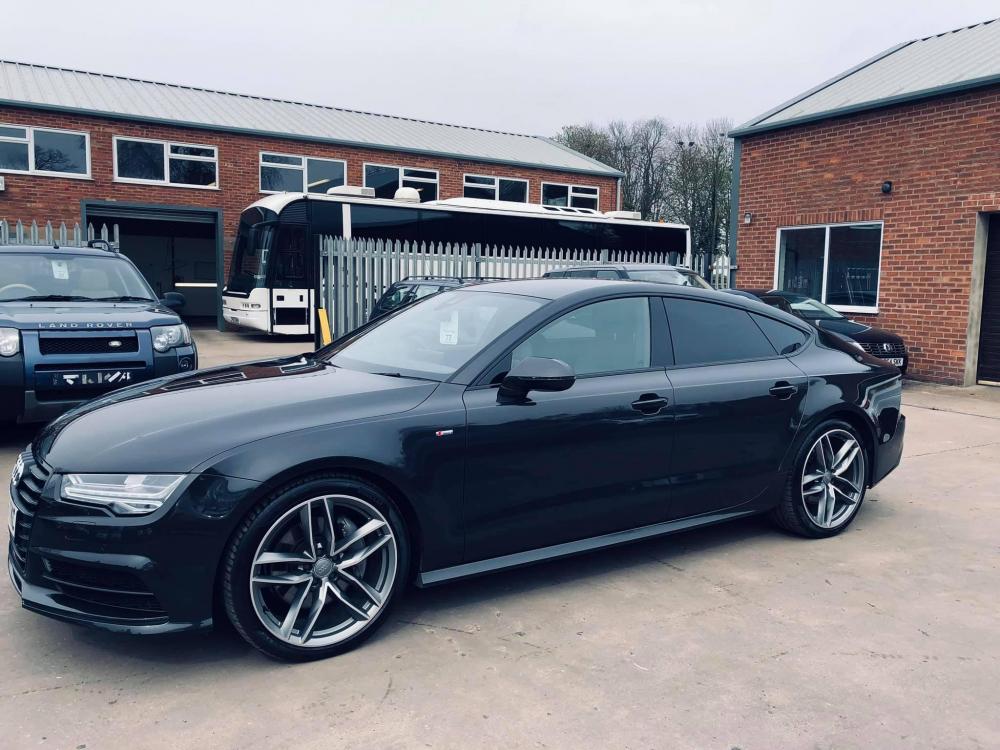
  1. Hi, thanks for the add. Recently purchased a 2017 (66 reg) Audi A7 3.0 Tdi Black Edition S Line Quattro (272) in Oolong Grey as the image below and now researching for any simple mods etc that I can do to her. Come from a Scirocco GTS which I had lowered, changed exhaust, upgraded diverter valve, wheel spacers, intake and stage 1 map so am keen to see what i can do with the A7. Wont be lowering her though as very happy with how she sits, rides and handles the bumps. Interested in maybe changing the front grille but not sure how easy it is. Like the look of the ones with the Quattro lettering at the bottom. Also might debade the rear as dont like the Tdi Quattro badges. Is there anything I can do with the funny shaped exhaust tips? Am I right in thinking that this would be a 7.5?


Background Picker
Customize Layout

Account

Navigation

Search

Search

Configure browser push notifications

Chrome (Android)
  1. Tap the lock icon next to the address bar.
  2. Tap Permissions → Notifications.
  3. Adjust your preference.
Chrome (Desktop)
  1. Click the padlock icon in the address bar.
  2. Select Site settings.
  3. Find Notifications and adjust your preference.