Skip to content
View in the app

A better way to browse. Learn more.

Audi Owners Club (UK)

A full-screen app on your home screen with push notifications, badges and more.

To install this app on iOS and iPadOS
  1. Tap the Share icon in Safari
  2. Scroll the menu and tap Add to Home Screen.
  3. Tap Add in the top-right corner.
To install this app on Android
  1. Tap the 3-dot menu (⋮) in the top-right corner of the browser.
  2. Tap Add to Home screen or Install app.
  3. Confirm by tapping Install.


Jairfaizal

Members
  • Joined

  • Last visited

Everything posted by Jairfaizal

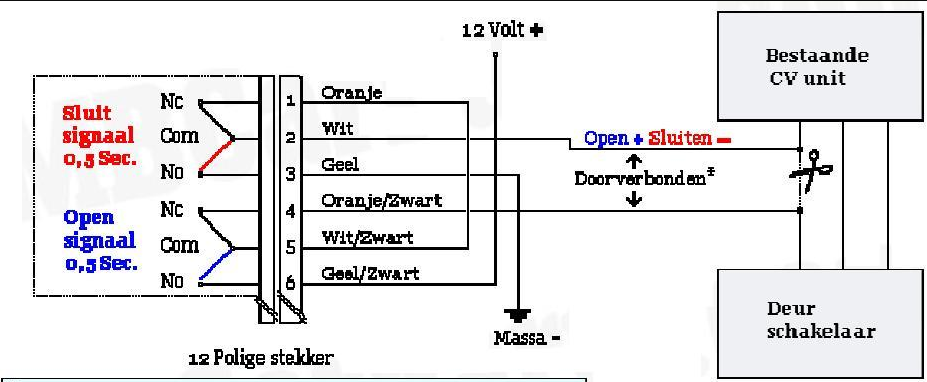
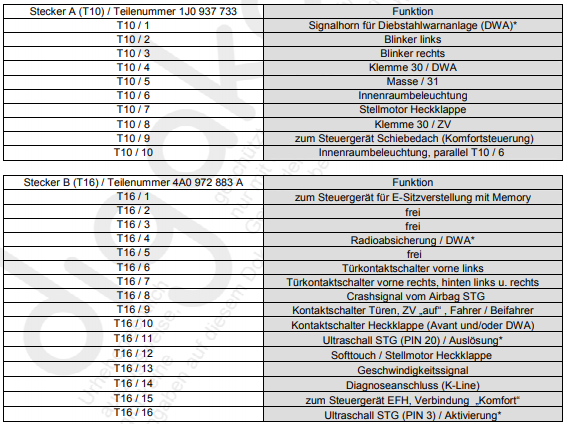
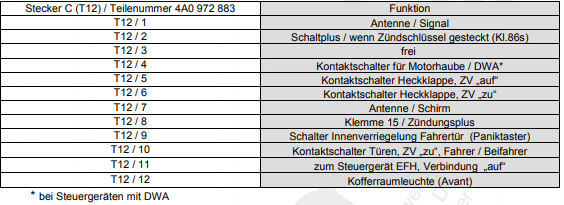
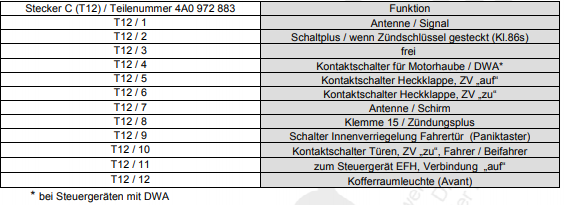
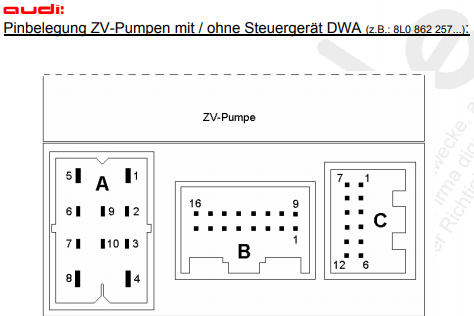
  1. Hello everyone, I'm Jari from the Netherlands and own a Audi A3 8L 1997. Have an question about the centraledoorlocksystem. Under is diagram of new doorlocksystem the White and Orange/black wire are my problem. Those wires has to connect to the original doorlocksystem of the car. Under are the pins/wires of the original doorlockpomp back in the A3 My question is whitch pin/wire I have to cut to put the white, orange/black wire on? I tride a couple already B T16/9 Than only the windows are open for 1/4 each time I press the key open. B T16/6 Than the alarm is going off if I press any key. C T12/10 all of the doors are locking and alarm is armed. But open doesn't work on the key. Who knows whitch pin/wireI have to use to make it work? Thank you in advance
Background Picker
Customize Layout

Account

Navigation

Search

Search

Configure browser push notifications

Chrome (Android)
  1. Tap the lock icon next to the address bar.
  2. Tap Permissions → Notifications.
  3. Adjust your preference.
Chrome (Desktop)
  1. Click the padlock icon in the address bar.
  2. Select Site settings.
  3. Find Notifications and adjust your preference.