




Skip to content
View in the app

A better way to browse. Learn more.

Audi Owners Club (UK)

A full-screen app on your home screen with push notifications, badges and more.

To install this app on iOS and iPadOS
  1. Tap the Share icon in Safari
  2. Scroll the menu and tap Add to Home Screen.
  3. Tap Add in the top-right corner.
To install this app on Android
  1. Tap the 3-dot menu (⋮) in the top-right corner of the browser.
  2. Tap Add to Home screen or Install app.
  3. Confirm by tapping Install.


son of orsum

Members
  • Joined

  • Last visited

  1. @Magnet I haven't checked with Audi yet, just like to look around to see what's out there. But I believe @Marty118 has the right one. Just bought the car and doing all the little bits and bobs to get it tip top, it was already in a fantastic condition however.
  2. Yea thats the one, I need the part number
  3. Brilliant thanks, is that the correct one, looks a bit long considering the Aux port?
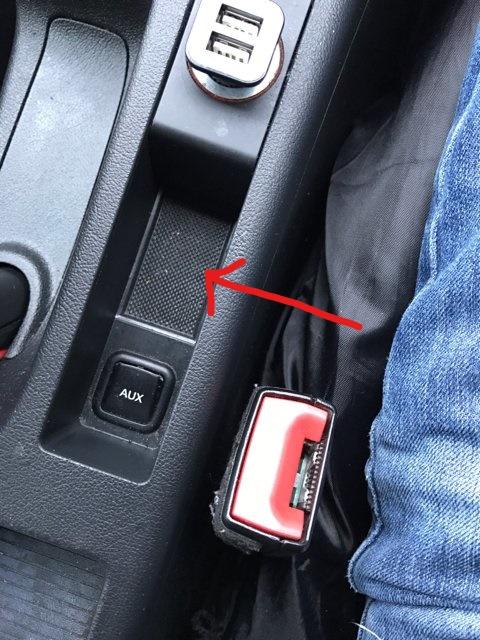
  4. Hi guys, I'm looking for the part number/any help on locating the part in the picture. Its the inner lining of the coin tray, if you would, which sits next to the Aux port. A3 2010 1.4TFSI Sport. TIA


Background Picker
Customize Layout

Account

Navigation

Search

Search

Configure browser push notifications

Chrome (Android)
  1. Tap the lock icon next to the address bar.
  2. Tap Permissions → Notifications.
  3. Adjust your preference.
Chrome (Desktop)
  1. Click the padlock icon in the address bar.
  2. Select Site settings.
  3. Find Notifications and adjust your preference.