Skip to content
View in the app

A better way to browse. Learn more.

Audi Owners Club (UK)

A full-screen app on your home screen with push notifications, badges and more.

To install this app on iOS and iPadOS
  1. Tap the Share icon in Safari
  2. Scroll the menu and tap Add to Home Screen.
  3. Tap Add in the top-right corner.
To install this app on Android
  1. Tap the 3-dot menu (⋮) in the top-right corner of the browser.
  2. Tap Add to Home screen or Install app.
  3. Confirm by tapping Install.

crj88

Members
  • Joined

  • Last visited

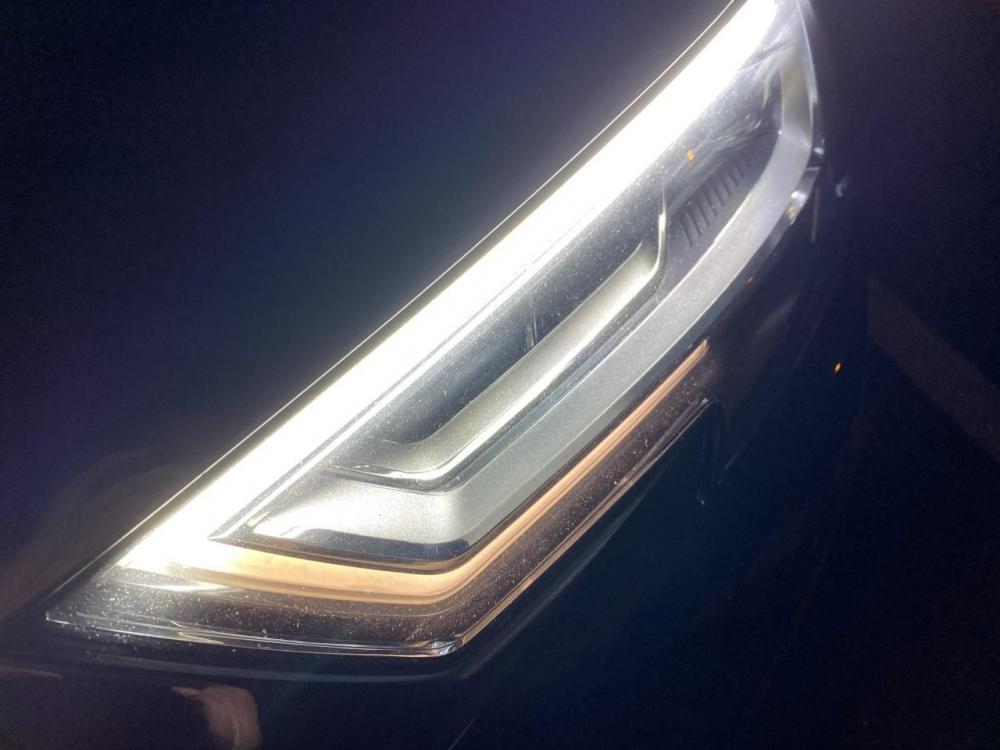
  1. Hi all, looking for a bit of help as i've exhausted many avenues (including Audi!) My DRL passenger side is dim on the lower part (pictured) - Audi are quoting a whole headlight replacement for £1200+! and are telling me the unit isn't openable to change bits of it, which isn't true as when I bought the car a circuit was replaced to make this DRL headlight work. Pictured below, anyone ever had or known of any similar issues? The lower bit is dim, so obviously working but not correctly. Perhaps a wiring issue? ballast? nobody seems to know, 2 audi service stations as well as 2 garages. Any help would be great.


Background Picker
Customize Layout

Account

Navigation

Search

Search

Configure browser push notifications

Chrome (Android)
  1. Tap the lock icon next to the address bar.
  2. Tap Permissions → Notifications.
  3. Adjust your preference.
Chrome (Desktop)
  1. Click the padlock icon in the address bar.
  2. Select Site settings.
  3. Find Notifications and adjust your preference.