





ShaneMax
Members
-
Joined
-
Last visited
Everything posted by ShaneMax
-
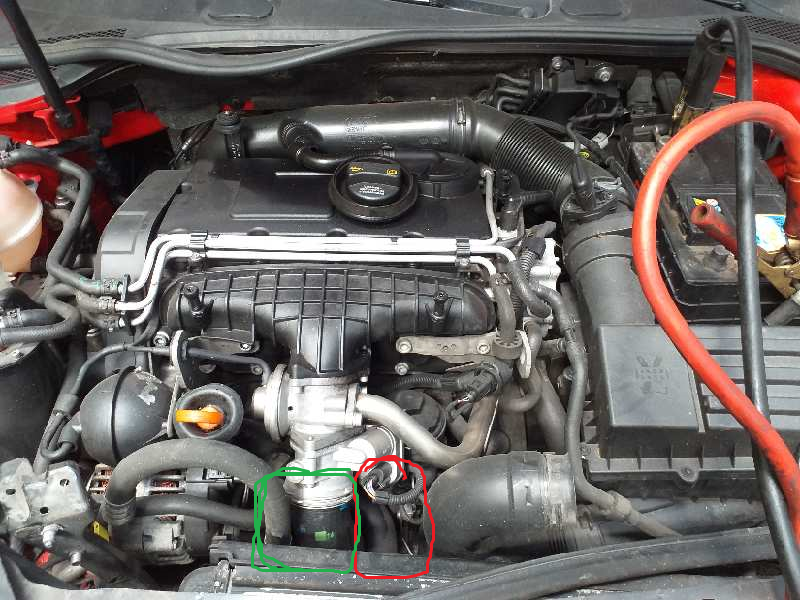
The engine cranks but will not fire, fired once after i broke down for a very short period of time with not response from throttle and very rough. The pipe circled in red is the one with a split in it which i am guessing is a coolant pipe. The green circled pipe is fitted incorrectly which is where the oil is coming from. Does any of this give any reasoning for why it wont fire up?
-
Please Help! Not long bought an A3 05 Plate dsg. Recently started using a lot of water but not had the time around work to get it checked out, i was on the motorway and had a loss of power. As I came to a stop at the slip road it cut out and wouldn't start again. After sitting for 4 1/2 hours waiting for recovery I had a look under the bonnet and found a split pipe covered in oil [ Guessing turbo pipe ]. so that would explain for the loss of power but now the car still wont run and there is no signs of the head gasket being gone. The car has never overheated when i have had it and i have kept the water/coolant topped up every time the light has came on. Has anyone had anything similar to this and could possible steer me in the right direction as the local garages aren't very trust worthy and money grabbers which don't fully fix the problems.