





Skip to content
View in the app

A better way to browse. Learn more.

Audi Owners Club (UK)

A full-screen app on your home screen with push notifications, badges and more.

To install this app on iOS and iPadOS
  1. Tap the Share icon in Safari
  2. Scroll the menu and tap Add to Home Screen.
  3. Tap Add in the top-right corner.
To install this app on Android
  1. Tap the 3-dot menu (⋮) in the top-right corner of the browser.
  2. Tap Add to Home screen or Install app.
  3. Confirm by tapping Install.


King Mustard

Members
  • Joined

  • Last visited

Everything posted by King Mustard

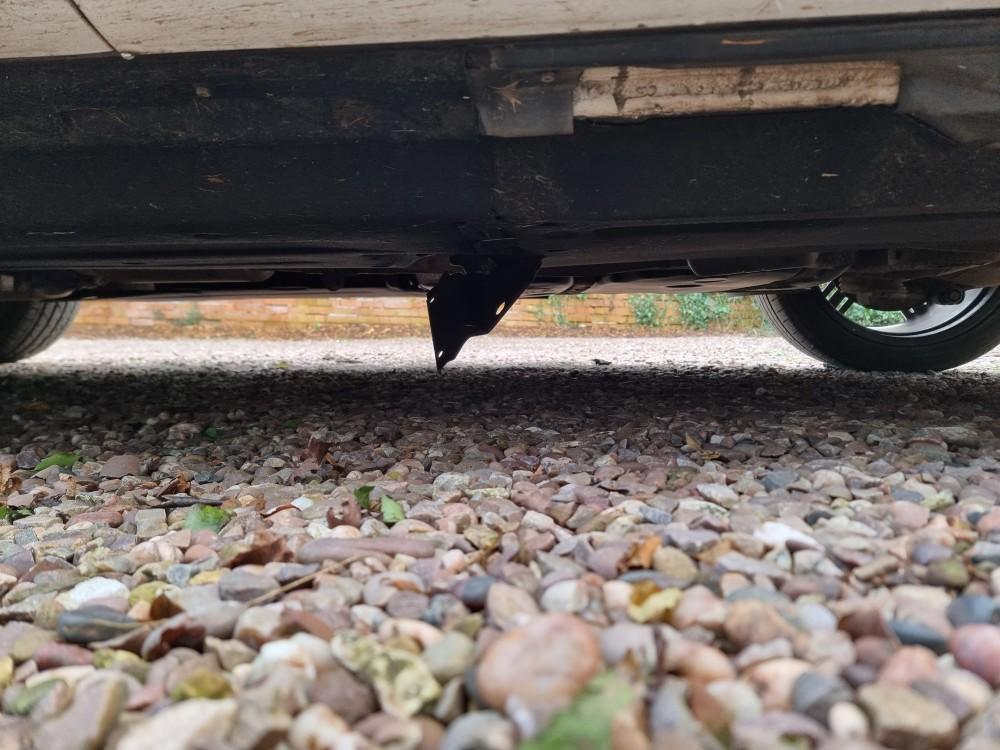
  1. Can anyone recognise what this may be?
  2. We are trying to find a cheap Bluetooth music adapter for a 2013 Q5 (UK). The car software states: "BNav_EU_P0206_D1", which I believe points to it being a 'MMI 3G Basic' system. I bought this dongle from Amazon: MASO AMI MDI MINI Bluetooth 4.0 USB Input Adapters Music Interface MP3 AUX Cable Adapter for Car, which I thought may work. The instructions for the adapter state to press Media then switch the source to 'Aux mode (external input)'. However, when Media then Source is selected in the car, there are only options for 'SD card', 'CDROM' and 'AMI' (which shows 'No device connected'). Have I simply bought the wrong adapter? When I search for "Q5 Bluetooth music" on Amazon, there are many results. Can anyone please help me narrow it down?



Background Picker
Customize Layout

Account

Navigation

Search

Search

Configure browser push notifications

Chrome (Android)
  1. Tap the lock icon next to the address bar.
  2. Tap Permissions → Notifications.
  3. Adjust your preference.
Chrome (Desktop)
  1. Click the padlock icon in the address bar.
  2. Select Site settings.
  3. Find Notifications and adjust your preference.