Skip to content
View in the app

A better way to browse. Learn more.

Audi Owners Club (UK)

A full-screen app on your home screen with push notifications, badges and more.

To install this app on iOS and iPadOS
  1. Tap the Share icon in Safari
  2. Scroll the menu and tap Add to Home Screen.
  3. Tap Add in the top-right corner.
To install this app on Android
  1. Tap the 3-dot menu (⋮) in the top-right corner of the browser.
  2. Tap Add to Home screen or Install app.
  3. Confirm by tapping Install.


Michael Daly

Members
  • Joined

  • Last visited

  1. Great thanks for the help all
  2. Hi Greg, thanks ya I'm thinking the same thing, I'll just bring it to roman and hopefully he will figure it out
  3. Yes iv done this, it cleared at one time for a full day and came up again, lost what to do next, thinking of going to electrical ecu specialist as this is my daily driver and is constantly beeping for weeks and am getting no joy in garage
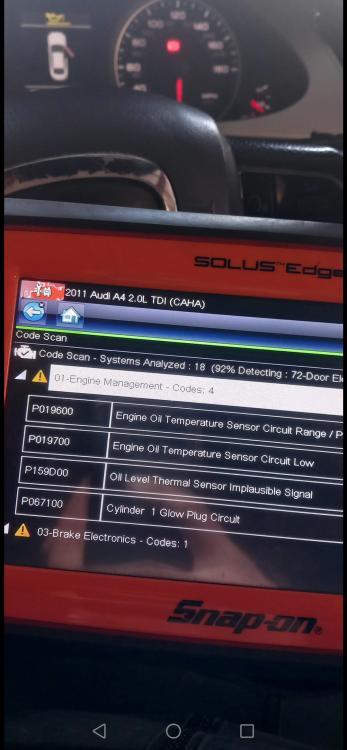
  4. Attaching picture thanks
  5. Hi all, New to this group, I bought an a4 170bhp with oil leveling sensor fault, bought oil leveling sensor and still on, bought hood lock and still on. Mechanic said he has checked wiring and can't see anything wrong, where do I go from here, Thanks


Background Picker
Customize Layout

Account

Navigation

Search

Search

Configure browser push notifications

Chrome (Android)
  1. Tap the lock icon next to the address bar.
  2. Tap Permissions → Notifications.
  3. Adjust your preference.
Chrome (Desktop)
  1. Click the padlock icon in the address bar.
  2. Select Site settings.
  3. Find Notifications and adjust your preference.