Skip to content
View in the app

A better way to browse. Learn more.

Audi Owners Club (UK)

A full-screen app on your home screen with push notifications, badges and more.

To install this app on iOS and iPadOS
  1. Tap the Share icon in Safari
  2. Scroll the menu and tap Add to Home Screen.
  3. Tap Add in the top-right corner.
To install this app on Android
  1. Tap the 3-dot menu (⋮) in the top-right corner of the browser.
  2. Tap Add to Home screen or Install app.
  3. Confirm by tapping Install.

brett sutton

Members
  • Joined

  • Last visited

Everything posted by brett sutton

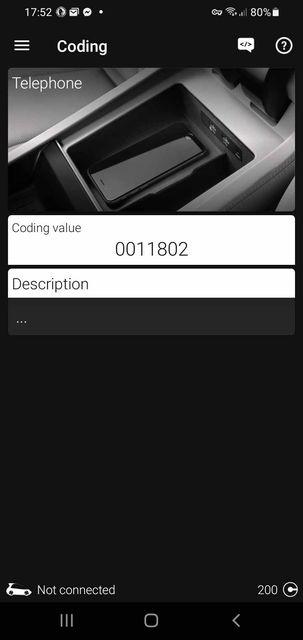
  1. Hi, new to this forum, this is the first time i've posted. I have a 57 plate audi a4, with rns-e satnav. I recently decided to install the original audi bluetooth telephone module. Got the unit and the wiring installed, but it still says telephone not installed on the satnav unit. My phone can see the bluetooth but wont connect (is this because i am inputting the wrong pairing code or because its not installed?). I presume its because the coding needs to be changed to install the module. Does anyone know either what the code is, where i can find the correct code or which digits need to be changed? I'm using OBDeleven and i'll attach a pic with the current code Thanks


Background Picker
Customize Layout

Account

Navigation

Search

Search

Configure browser push notifications

Chrome (Android)
  1. Tap the lock icon next to the address bar.
  2. Tap Permissions → Notifications.
  3. Adjust your preference.
Chrome (Desktop)
  1. Click the padlock icon in the address bar.
  2. Select Site settings.
  3. Find Notifications and adjust your preference.