Skip to content
View in the app

A better way to browse. Learn more.

Audi Owners Club (UK)

A full-screen app on your home screen with push notifications, badges and more.

To install this app on iOS and iPadOS
  1. Tap the Share icon in Safari
  2. Scroll the menu and tap Add to Home Screen.
  3. Tap Add in the top-right corner.
To install this app on Android
  1. Tap the 3-dot menu (โ‹ฎ) in the top-right corner of the browser.
  2. Tap Add to Home screen or Install app.
  3. Confirm by tapping Install.


Scodge

Members
  • Joined

  • Last visited

Everything posted by Scodge

  1. Scodge posted a topic in Audi A3 (8V) Forum
    A3 2015 sline tdi auto does it have usb port because i cant find one.. its not in the front centre console as described on you tube.. help plz ๐Ÿ˜„ i know its not a big deal they are a fiver on amazon that go in the cig lighter port but would be nice to find it ๐Ÿ˜„๐Ÿ‘
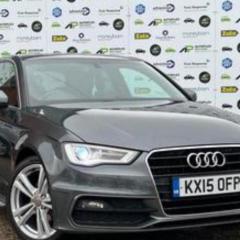
  2. Hi everyone just bought a 2015 sline auto in dark grey love it to bits awesome car.. ๐Ÿ™‚ i have a new badge to go on the front grill as the old one is looking a bit tired.. any tips on how to get it off and the new one on without breaking something ๐Ÿ˜„ im hopeless with this stuff.. Cheers ๐Ÿ™‚


Background Picker
Customize Layout

Account

Navigation

Search

Search

Configure browser push notifications

Chrome (Android)
  1. Tap the lock icon next to the address bar.
  2. Tap Permissions โ†’ Notifications.
  3. Adjust your preference.
Chrome (Desktop)
  1. Click the padlock icon in the address bar.
  2. Select Site settings.
  3. Find Notifications and adjust your preference.