





WayneDun
Members
-
Joined
-
Last visited
-
Totally understand, and will be testing the fuses shortly to discover just that! Thanks again for you help.
-
Thanks Clifford. I haven't looked into testing the fuses with a multimeter, as I was hoping that the fuse box layout I have would be common across the model and age, and that someone with the same would have already hardwired their satnav and perhaps specify which fuse they piggybacked.
-
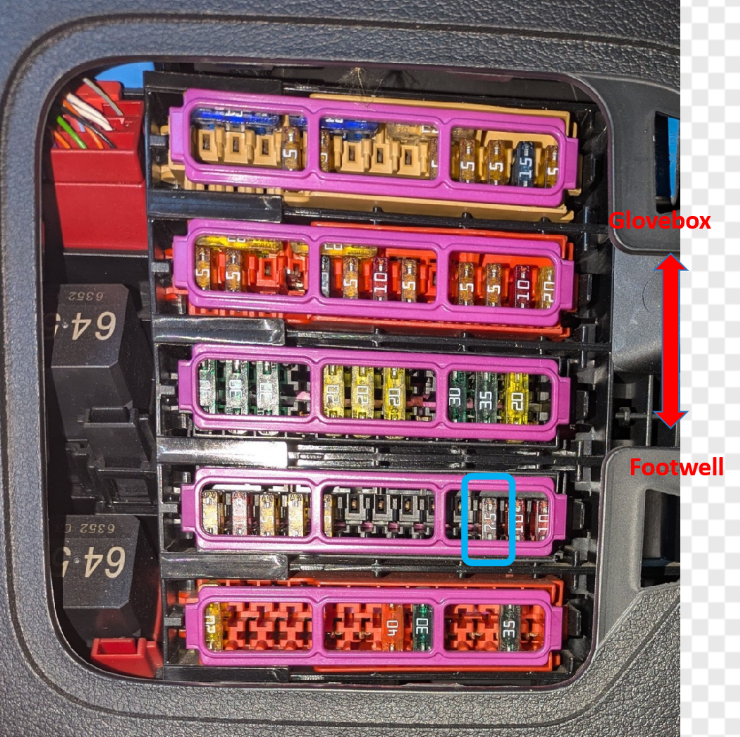
Hello all, Newbie here and glad to be back in an Audi after years of tinkering with other German makes. I have bought a Nextbase 422GW (secondhand) and will be shortly hardwiring it my car, however the video below shows the fuse to use is a 5A, yet the one in the same position in my fusebox is 7.5A. Would this be a problem if I used this one or should I choose another?.....Any advice would be greatly received (pic of my fusebox below with blue highlight around fuse). Cheers all Wayne
-
Thank you Steve. Looking forward to reading important information (news, facts and stories) in the forum over the coming years. Cheers 😉 Wayne
-
Hello everyone, I'm excited to join this forum as I'll be collecting my 2017 Audi A5 Cabriolet 2.0 S Line TFSI tomorrow! Having previously driven Mazda MX-5s and Mercedes SLKs, I’m looking forward to getting back into an Audi, especially given my fond memories of owning a 2003 A3 1.9 TDI and a 2005 A4 1.9 TDI Multitronic. Audi’s reputation for superb build quality and beautifully crafted interiors has always impressed me, and I can’t wait to experience it again with my new Cabriolet, although this summer hasn't been the greatest so far! Looking forward to sharing experiences and learning from fellow Audi enthusiasts! Wayne
