TheTallBloke
Members
-
Joined
-
Last visited
Everything posted by TheTallBloke
-
-
You could be right.. however I don't hear the motor spinning or any noise when the screen should be raising/lowering. I would have expected a buzzing or spinning kind of noise during that time. If the gears are broken and then jammed with the broken parts, then potentially I wouldn't hear any noise either. If I can detach the two cable plugs, I might be able to take the motor out and see if the gears or broken though..
-
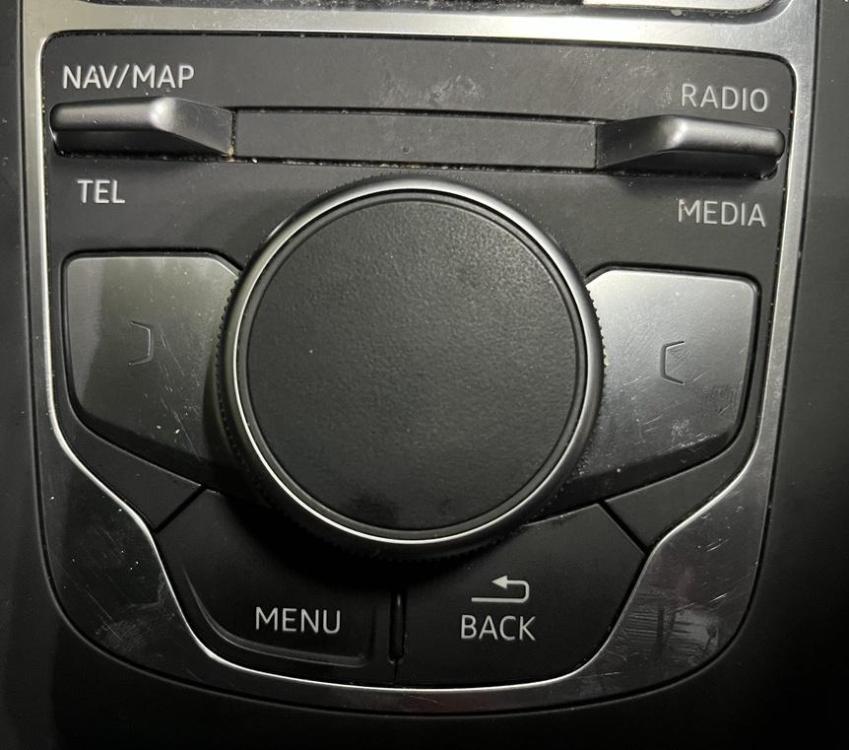
Thanks.. I'll have to keep searching for the correct reboot sequence for my model, as I only have the buttons shown in the photo below and every combo I've found online so far hasn't worked to reset or reboot anything. I've managed to turn the system off by pressing and holding the volume knob only.
-
The MMI screen in my 2017 A3 (8V??) won't go up anymore. For a while it's been making a weird noise sometimes when the car starts and the screen is moving up as the system starts up. It seemed to be a mechanical noise, like something was rubbing against something, or a gear with grinding, but it was really hard to pinpoint. Also, not my daily driver, so I often forgot that it happened. Now the screen comes on, but doesn't rise out of the dash. I was able to remove it from the dash and see the screen working, and the whole time bluetooth audio and radio have been functioning while the screen is stuck in the down position. I've checked all the fuses that referenced "Infotainment Components" in the manual. Oddly "F16" which is marked as "infotainment components" was missing from the fuse box completely. I can only assume it was always missing. I did temporarily put a 10-amp fuse in there in case it had fallen out somehow, but the screen still didn't rise. If I can't get the screen to go up and down like it's supposed to, I'd be happy to have it up permanently. Does anyone have a suggestion for either: Something else to check, maybe there is an oddly labelled fuse that might still be connected to the screen operation or Any ideas on how to get the screen to go up? I did think that it would be possible to just supply power to the motor that's stuck on the back of the screen assembly. Maybe that would spin and raise the screen. I don't hear any noises like the screen is trying to rise up out of the dash. Any suggestions would be greatly appreciated. Thanks
-
This car has only one usb port with a “charge only” label above it.
-
EDIT: Just realised this is in the A6 section, if someone is able to move it to the A3 or tell me how to delete, that would be great. ---- Is it possible to software update something to get carplay on my 2018 A3? We had a 2017 A3, and it had a second USB plug under the armrest; this one doesn't have that second port. Is there a software update that will add it, or can Audi do it somehow? I did ask at a dealership, and the guy said the only way was to install a new stereo at roughly $1500AUD. Screw that!! Even if I have to install the second USB plug or kit, that would be ok. Thanks