




Skip to content
View in the app

A better way to browse. Learn more.

Audi Owners Club (UK)

A full-screen app on your home screen with push notifications, badges and more.

To install this app on iOS and iPadOS
  1. Tap the Share icon in Safari
  2. Scroll the menu and tap Add to Home Screen.
  3. Tap Add in the top-right corner.
To install this app on Android
  1. Tap the 3-dot menu (⋮) in the top-right corner of the browser.
  2. Tap Add to Home screen or Install app.
  3. Confirm by tapping Install.

jono73

Members
  • Joined

  • Last visited

Everything posted by jono73

  1. Thanks I think it’s part of the door card however there is another way, wrap some tape around the white sleeve until it compensates and grips. The Audi A3 owners group on fbook is a handy site 👍🏼
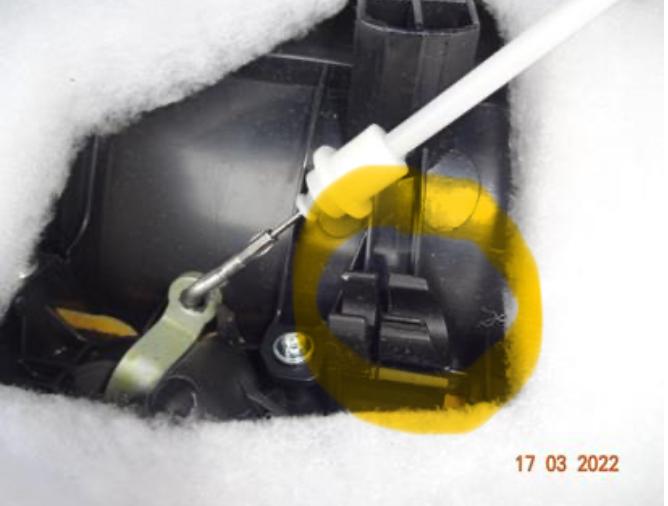
  2. Hi folks, this is my first post so I appreciate any feedback as I’ve searched around the site and web for an answer and can’t seem to find anything. In the picture is a black retainer clip (this is not my one, just an example) When attempting to put the door card back on it seems like the clip won’t grip the white plastic sleeve that pops in. I’m wondering if the part can be replaced or repaired, I did notice a small torx screw next to it, undone it but it didn’t come off. Thanks a lot John


Background Picker
Customize Layout

Account

Navigation

Search

Search

Configure browser push notifications

Chrome (Android)
  1. Tap the lock icon next to the address bar.
  2. Tap Permissions → Notifications.
  3. Adjust your preference.
Chrome (Desktop)
  1. Click the padlock icon in the address bar.
  2. Select Site settings.
  3. Find Notifications and adjust your preference.