kotu
Members
-
Joined
-
Last visited
Everything posted by kotu
-
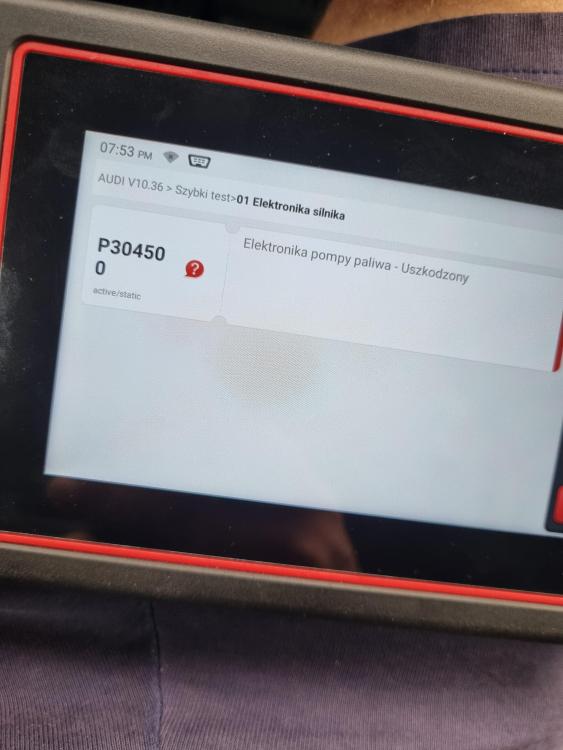
Today I connected my computer and the engine control unit showed error P304500 – fuel pump electronics (faulty). I last scanned it about two months ago and it was clean. I should add that I can't clear the error with the engine running or with the ignition on. Has anyone else had this error with their engine? Where should I start? Audi a6 c8 45tfsi 2019
-
I recently pulled the fuses from 1. Driver assistance system controller 2. Crossroad assistant, driver assistance systems 3. Surround camera The cause was the 360 surrounding camera jamming (I wanted to put the controller to sleep for a moment) and I guess I messed up. Now almost all driver assistance systems are inactive. Audi adaptive light: fault! High beam assistant: fault! Audi pre sense: currently limited. There were a lot of errors. The ones I can't delete are: 00A5- Front sensors of driver assistance systems 65537 C12D8F Crossroad assistant HMI status feedback unreliable CAN bus, fault 0009- Central electronic system 67735 U112300 Data bus, received fault value (00001001 Active 0009 Central electronic system 67737 U112300 Data bus, received fault value (00001001 Active Before this, maybe 5 times I had these systems not working, but after waiting 10 minutes and restarting the car, everything worked. Now it still doesn't work. I think the j1121 controller is damaged How can I check this?? I have an ODIS diagnostic cable.
-
I have the same problem in Audi a6 2019. These are errors from the controller. B127C04 B127F04 B200FFA C12D8F0 Mstv did you solve your problem?