




Skip to content
View in the app

A better way to browse. Learn more.

Audi Owners Club (UK)

A full-screen app on your home screen with push notifications, badges and more.

To install this app on iOS and iPadOS
  1. Tap the Share icon in Safari
  2. Scroll the menu and tap Add to Home Screen.
  3. Tap Add in the top-right corner.
To install this app on Android
  1. Tap the 3-dot menu (â‹®) in the top-right corner of the browser.
  2. Tap Add to Home screen or Install app.
  3. Confirm by tapping Install.

Help

Members
  • Joined

  • Last visited

  1. Help replied to Help's topic in Audi A6 (C4) Forum
    Will do 👍
  2. Help replied to Help's topic in Audi A6 (C4) Forum
    It just came back and wouldn’t start but the day before the power wasn’t there it was like in limp mode the garage I use isn’t open till after the new year I’ll just have to wait but thanks for the help it’s given me something to think about thanks
  3. Help replied to Help's topic in Audi A6 (C4) Forum
    No it’s not misfiring but the heater plug sign was flashing it wouldn’t clear thanks
  4. Help started following Fuel problem and Fuel problem
  5. My car won’t start put my little tester on and this is what it said I haven’t a clue it’s Christmas Eve Eve and I need my car so no garages open any help or advice would be really appreciated thanks
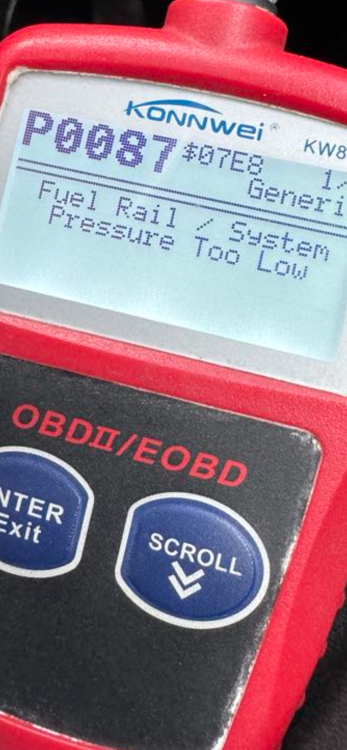
  6. My car won’t start put my little tester on and this is what it said I haven’t a clue it’s Christmas Eve Eve and I need my car so no garages open any help or advice would be really appreciated thanks


Background Picker
Customize Layout

Account

Navigation

Search

Search

Configure browser push notifications

Chrome (Android)
  1. Tap the lock icon next to the address bar.
  2. Tap Permissions → Notifications.
  3. Adjust your preference.
Chrome (Desktop)
  1. Click the padlock icon in the address bar.
  2. Select Site settings.
  3. Find Notifications and adjust your preference.