vdh_19
Established Member
-
Joined
-
Last visited
Everything posted by vdh_19
-
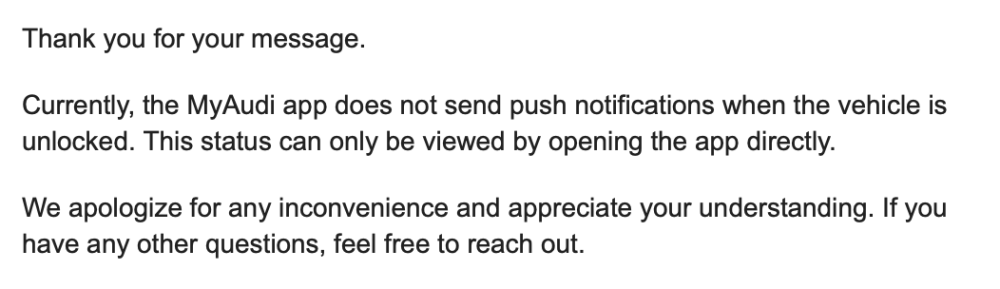
Response from Audi regarding push notifications in the event the vehicle is left unlocked.
-
I don't use the fob, I use the digital key on my phone which, touch wood, has been fairly reliable. I may start carrying the fob now, though, if there's a chance that someone could clone it and take the vehicle off my hands...wishful thinking!!
-
Very odd in that case. Unrelated to the boot issue, I've noticed the locking of the car via hand gesture on the door handle is not as effective as it was before. I have to tap/press on it two or three times for it to register and then lock the vehicle.
-
I would but unfortunately I have to wait around a month for a service appointment, which is annoying.
-
Following the software being upgraded to KD2 (version 03.10.00/C), I've noticed a new issue relating to the boot/tailgate and specifically the foot gesture control. It responds normally to the initial gesture to open the boot, however when I try the same gesture to close it I just get a series of beeps. I thought perhaps it was an issue with the surrounds and maybe the sensors detected an obstruction, but that doesn't seem to be the case as I've tried it in multiple locations. The normal button controls work fine - it's just the foot gesture control.
-
I get app notifications about the charging status and I had a notification once about the alarm but nothing else (i.e. no locked/unlocked notifications).
-
No, I don't get any notifications. It displays unlocked in the app but no push notifications.
-
So, it seems the issues I mentioned above were purely down to a glitch in the new software, I assume. I ended up setting up a new myAudi ID, using a different email address, and reset the car to factory settings. Sure enough, the Audi store, Wi-Fi option, and a few other bits all of a sudden reappeared! I was also able to set up my phone as a digital key. I noticed they've reintroduced the sharing option for the digital key, so I'll test that out later today with my wife's device.
-
I received my vehicle back today from the service centre. There is still no fix available for the charging issues (they've noted on the invoice that Audi is working on a fix for Q4 this year). Traffic sign recognition seems to work ok, but admittedly I never actually noticed many issues with that previously as I usually turned it off before starting a journey. They appear to have removed the Audi store and the ability for the car to connect to a Wi-Fi network, unless I'm being a bit thick but I cannot find the options anymore. I've noticed a couple of glitches with Android Auto not populating the side/task bar (a grey bar shows in its place). Restarting Android Auto solves the issue. I can no longer set up my phone as a digital key, which is really frustrating. Following the necessary steps, the myAudi app just reports "Connecting failed due to a network error". I've tried it in different locations to ensure the phone and car have mobile data coverage but to no avail.
-
Will do! To be honest, my setting off routine has involved turning off the recognition/warning alarms and lane guidance altogether, so I'll see how it performs when I get the vehicle back (they're keeping it overnight for further testing).
-
The service centre has completed the software upgrade on my Q6. For reference, I believe the version number is 03.10.00/C (previous version on my vehicle was 03.01.00/C).
-
No problem, thank you!
-
Many thanks for sharing this. My vehicle is currently back in with the service centre to fix the growing list of faults, not many of which appear in the list above unfortunately. Do you happen to know what the version number of the software is?
-
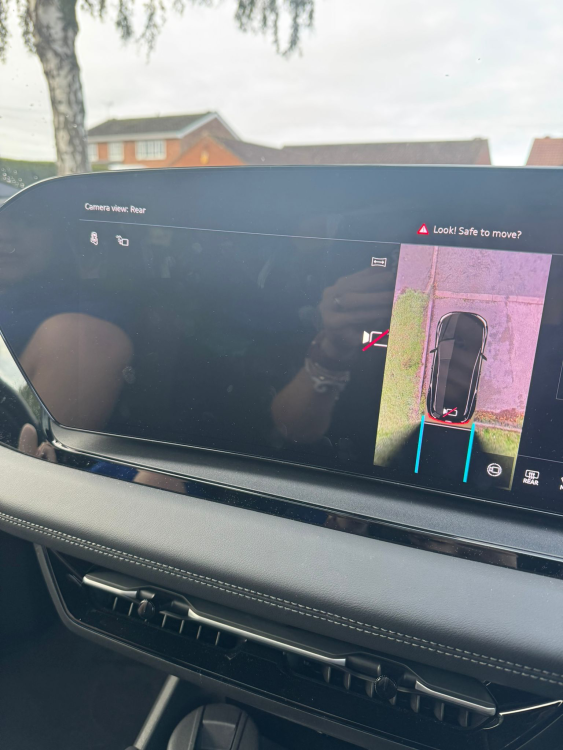
An additional fault popped up yesterday, one to add to the growing list. The rear/reversing camera no long works. I've contacted the lease company and notified them that I want to reject the vehicle. I accept things go wrong now and again, but surely it isn't normal to have so many issues with a brand new car.
-
There is an update coming for the Q6/A6 but it is supposedly for the US vehicles and not European vehicles. That would line up with what I've seen on one of the Reddit threads. Seemed a little vague on the details to me, though, so don't take my word for it.
-
They're not aware of any updates coming, but that's not to say there isn't one. Unfortunately, there is no known fix for my issue, so it looks like it will be going back. It relates to what the vehicle perceives as overcurrent and shuts down charging.
-
Hope so. The rest of the problems I can live with for now (not that you should have to live with issues with a brand new car!) but the charging is kind of a big one.
-
I think as with any car, sometimes you get a good one, sometimes you get a bad one. The charging issues seem to be the most common it seem. Thanks for the heads-up on the software update. I'll see what they say here and let you know if it's a similar story.
-
Just dropped the car at the Audi service centre this morning. Very nice service person's opening line: "Ah the Q6...the problem car...". Main issues appear to be charging related and they're seeing the same thing with the A6. Bodes well. Already set my expectations that even after diagnosis, I might be waiting some time for the faults to be resolved as they'll be waiting on Audi.
-
Regarding you comment around rejection, is this an actual process I can follow if it gets to that point? My vehicle is on a corporate lease and the issuing dealership has little interest in helping to resolve the faults. I'm not sure what the options are in terms of sending it back.
-
This is the front side passenger door. I haven't noticed the same with the rear doors but they've been less frequently used so far.
-
In received my Q6 around two weeks ago and I've had nothing but issues so far. I've documented the errors/issues so far: Charging Issues Following the disappearance of an initial error message after a few short journeys, the vehicle is now experiencing significant charging failures. Whether connected to public charging stations or my home charger, sessions terminate often within minutes and display errors such as: “Charging not possible. A technical error occurred" “An error has occurred in the charging network" I have tested multiple charging providers, sites, and speeds, with the same result. Home charging-specific issue: With no saved charging locations, the vehicle should default to “Immediate Mode.” Instead, charging terminates prematurely, and the car automatically creates a saved location with a randomly assigned charging timer. Even after deleting the timer, manually selecting “Immediate” charging, or deleting the auto-saved location altogether, the issue repeats. The only current workaround is to disable the location feature in the vehicle entirely, which negatively impacts other app-based functions Range Performance The advertised range for the Q6 S Line Performance is 350–360 miles. On the only occasion the vehicle has successfully charged to 100%, the displayed range immediately after charging was 290 miles. In practice, the maximum real-world range achieved has been under 260 miles, despite careful driving and minimal use of climate control and other battery-impacting features. As a long-term EV owner (Tesla Model 3 for 4 years), I am familiar with range optimisation and how different vehicle systems affect the battery/range, but the Q6 is consistently underperforming relative to specification. Sensor and Warning Errors Within two days of delivery, a tyre pressure loss warning appeared despite all tyres being correctly inflated. The only resolution was to manually reset pressures through the vehicle menu. The vehicle frequently generates false “door open” warnings, affecting the boot, passenger door, and bonnet. The passenger door, however, does appear to have a fault with the locking mechanism, as it requires excessive force (relative to the other doors) to close securely. Driver Assist System On one occasion, the driver assist system failed to initialise on startup. The fault could only be cleared after restarting the vehicle multiple times. Android Auto & USB-C Functionality The USB-C charging sockets do not provide reliable charging while Android Auto is active, significantly reducing usability of this feature. When Android Auto is active, plugging the device in to charge via USB C rather than using wireless charging interferes with Android Auto. If Android Auto/Apple CarPlay is active, I cannot charge a second device without it interfering with the media controls.