




Skip to content
View in the app

A better way to browse. Learn more.

Audi Owners Club (UK)

A full-screen app on your home screen with push notifications, badges and more.

To install this app on iOS and iPadOS
  1. Tap the Share icon in Safari
  2. Scroll the menu and tap Add to Home Screen.
  3. Tap Add in the top-right corner.
To install this app on Android
  1. Tap the 3-dot menu (⋮) in the top-right corner of the browser.
  2. Tap Add to Home screen or Install app.
  3. Confirm by tapping Install.

Tomasq7

Members
  • Joined

  • Last visited

Everything posted by Tomasq7

  1. Sorry for being spammy, this is the image:
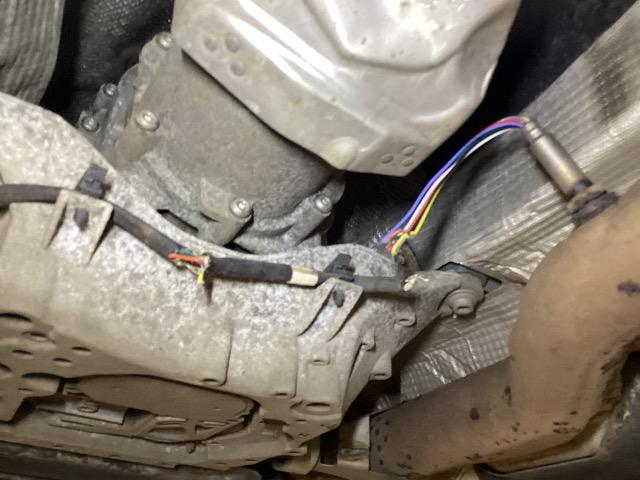
  2. thanks for coming back. I was thinking maybe even find a used part. But so far honestly struggling a bit with identifying oem number
  3. Hello, I am seeking advice for my Audi Q7 Diesel 2017 (pre timing belt fix). I have a great fun of having nox sensor cabling in front of the car chewed through by a fox triggering engine fault warning. From the garage that did the inspection I got a massive 1150 quid bill, which to me feels like heavily inflated as they would keep car for the day for what sounds like a unplug - plug in work. And I am basing it on the recommended tyre change price. Has anyone dealt with this? Is rewiring an option? I am based in south east London (Sidcup), does anyone knows VAG specialist that would not be insanely far that would help me out?


Background Picker
Customize Layout

Account

Navigation

Search

Search

Configure browser push notifications

Chrome (Android)
  1. Tap the lock icon next to the address bar.
  2. Tap Permissions → Notifications.
  3. Adjust your preference.
Chrome (Desktop)
  1. Click the padlock icon in the address bar.
  2. Select Site settings.
  3. Find Notifications and adjust your preference.