kainep
Members
-
Joined
-
Last visited
Everything posted by kainep
-
Been living with a problem with my Cabriolet window switches - decided to fix it Issue: Only my drivers window switch and 'master' switch works. All the windows work on the Master switch but I can't do the Passenger Front/Rear and Drivers Rear from the individual switches Points to a switch pack issue, but before look to take it out I wondered if anyone has any pointers for me Also will the switch pack lift out without removing the door card? If not, does the door card pull straight off (fir trees) or does if need sliding first (i.e. hooked into place) - trust that makes sense (does in my head haha) Thanks in advance Kaine
-
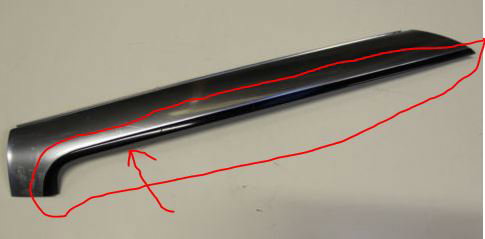
Hello - newbie here Just noticed I've lost the LH Plastic Trim on the chrome A-Pillar (see pic). Just been on ebay to get a replacement and looks like I have to buy the whole Chrome part at min £35 which is a pain as don't need that bit Anyone breaking an A4 that may have this bit? Thanks in advance Kaine