




Skip to content
View in the app

A better way to browse. Learn more.

Audi Owners Club (UK)

A full-screen app on your home screen with push notifications, badges and more.

To install this app on iOS and iPadOS
  1. Tap the Share icon in Safari
  2. Scroll the menu and tap Add to Home Screen.
  3. Tap Add in the top-right corner.
To install this app on Android
  1. Tap the 3-dot menu (⋮) in the top-right corner of the browser.
  2. Tap Add to Home screen or Install app.
  3. Confirm by tapping Install.

the_dan

Members
  • Joined

  • Last visited

Everything posted by the_dan

  1. he didnt want to sell it off straight and the bids are moving up now so i dont think i'll bother - i remember now why i hate ebay and stopped using it years ago! i find it weird that audi have stopped selling it without replacement - but it looks like similar or even the same systems are in jag/land rover and alfa/fiat so i might see if one of those comes up - always a bit of a risk though without knowing if it fits!
  2. done - i hate ebay auctions anyway so let's see if we can get it done quicker and easier. typical of me that i am buying toys for a car i haven't collected yet!! cheers
  3. perfect, thanks mate, and yet another part number for the same set!!
  4. update, the part number might be 4F9061206 as well / instead - hard to understand the audi parts guys! but in their wisdom audi have apparently discontinued this system last year without replacement.......
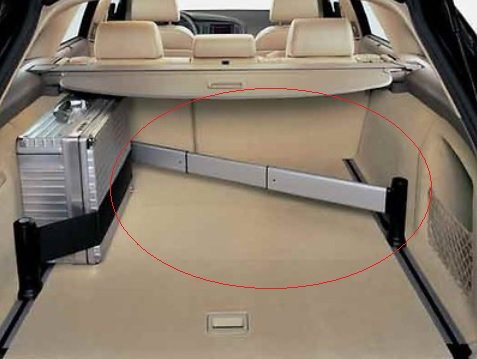
  5. hi all, picking up my c6 avant later today and although it has the luggage rail system in the boot it seems someone has had off with the telescopic bars and cargo strap system that mount in the runnners. i've searched everywhere and think i am after audi part number 4F9860204 which i think has both - but everything is either over £300 from audi (even then hard to find) or really old expired ebay auctions. has anyone bought these aftermarket and know where i can get a set please? thanks in advance dan


Background Picker
Customize Layout

Account

Navigation

Search

Search

Configure browser push notifications

Chrome (Android)
  1. Tap the lock icon next to the address bar.
  2. Tap Permissions → Notifications.
  3. Adjust your preference.
Chrome (Desktop)
  1. Click the padlock icon in the address bar.
  2. Select Site settings.
  3. Find Notifications and adjust your preference.