


Leaderboard
-
WPAWS
Established Member4Points1,717Posts -
niedzial1983
Established Member1Points1,264Posts


Popular Content
Showing content with the highest reputation on 07/23/2018 in Posts
-
1 pointMamma Mia! Here We Go Again who is not looking forward to this, wife is already bugging me for flick tickets i must admit i am looking forward to this film but dont tell the wife lol1 point
-
1 pointbe sure the garage you got it from are happy for you to bill them as they may not honour the deal, i would first talk to the original garage, if they value your custom they will want to help fix any issues. i know what you mean about loving your car but the boot not opening would for me too be a major issue1 point
-
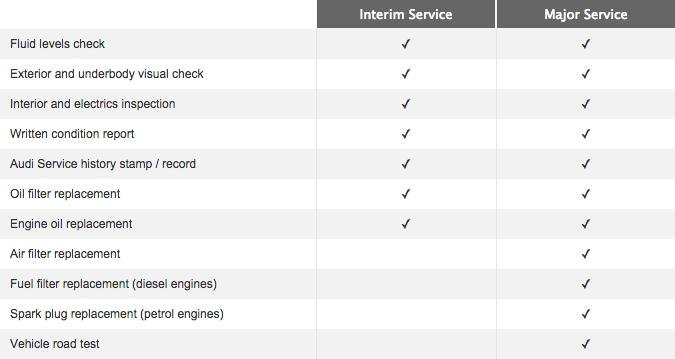
1 point1 point1 pointCar booked in for the 31st of this month for a major service as per Audi spec for £297.17
 1 point1 pointNextbase 312gw is good and less than 100£. I have one for 2 years hardwired to the fusebox. Never a problem1 point
