




Skip to content
View in the app

A better way to browse. Learn more.

Audi Owners Club (UK)

A full-screen app on your home screen with push notifications, badges and more.

To install this app on iOS and iPadOS
  1. Tap the Share icon in Safari
  2. Scroll the menu and tap Add to Home Screen.
  3. Tap Add in the top-right corner.
To install this app on Android
  1. Tap the 3-dot menu (⋮) in the top-right corner of the browser.
  2. Tap Add to Home screen or Install app.
  3. Confirm by tapping Install.

Mr_S49

Members
  • Joined

  • Last visited

Everything posted by Mr_S49

  1. The part that was replaced in my car was p/n 04L 906 051 K
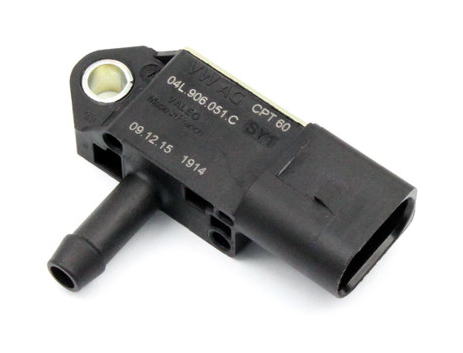
  2. When the message drive system fault happened the car did not accelerate normally and only built up speed very slowly.
  3. I had my car inspected by my local Audi specialist garage, the drive system fault errors were related to a turbo under boost issue. Unfortunately the garage were unable to recreate the fault but recommended to change the MAP sensor as that was the first error appearing. 100% solved the problem. My car is a 2019 Q5 2.0 40 TDI Sport.
  4. Hi, I also have a 2019 Q5. What did you find was the issue in the end? I'm experiencing the same symptoms over the past few days and hoping it was something simple and inexpensive! Fingers crossed!



Background Picker
Customize Layout

Account

Navigation

Search

Search

Configure browser push notifications

Chrome (Android)
  1. Tap the lock icon next to the address bar.
  2. Tap Permissions → Notifications.
  3. Adjust your preference.
Chrome (Desktop)
  1. Click the padlock icon in the address bar.
  2. Select Site settings.
  3. Find Notifications and adjust your preference.