




Skip to content
View in the app

A better way to browse. Learn more.

Audi Owners Club (UK)

A full-screen app on your home screen with push notifications, badges and more.

To install this app on iOS and iPadOS
  1. Tap the Share icon in Safari
  2. Scroll the menu and tap Add to Home Screen.
  3. Tap Add in the top-right corner.
To install this app on Android
  1. Tap the 3-dot menu (⋮) in the top-right corner of the browser.
  2. Tap Add to Home screen or Install app.
  3. Confirm by tapping Install.


Val

Members
  • Joined

  • Last visited

  1. I have the same problem as you. Can you tell me how you solved it please?
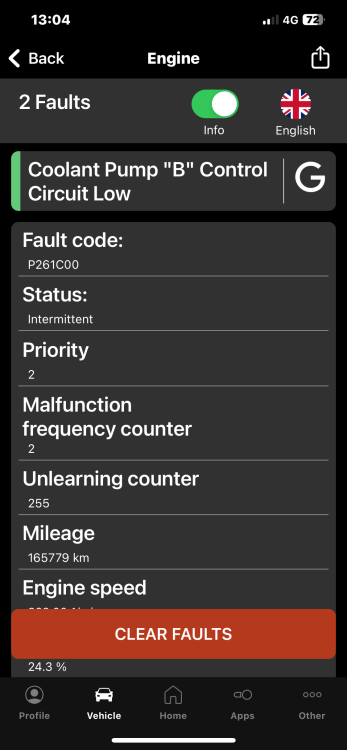
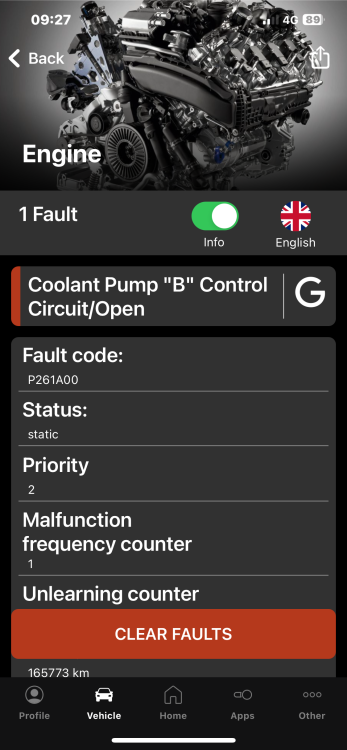
  2. Hello, When I scan the car, the two error codes appear ( P261A and P261C).I changed the auxiliary water pump that pushes the water to the gas cooler and after I delete them, if I start the engine, they appear again. What else do I need to check or change because I don't know what else to do. PS: Until I changed the pump, I only had the P260A error and it won't let me delete it. Now, after I changed the pump, the two errors appear and I can delete them, but they appear again after I start the car. Thank you If I posted in the wrong place, please forgive me.
Background Picker
Customize Layout

Account

Navigation

Search

Search

Configure browser push notifications

Chrome (Android)
  1. Tap the lock icon next to the address bar.
  2. Tap Permissions → Notifications.
  3. Adjust your preference.
Chrome (Desktop)
  1. Click the padlock icon in the address bar.
  2. Select Site settings.
  3. Find Notifications and adjust your preference.