




Skip to content
View in the app

A better way to browse. Learn more.

Audi Owners Club (UK)

A full-screen app on your home screen with push notifications, badges and more.

To install this app on iOS and iPadOS
  1. Tap the Share icon in Safari
  2. Scroll the menu and tap Add to Home Screen.
  3. Tap Add in the top-right corner.
To install this app on Android
  1. Tap the 3-dot menu (⋮) in the top-right corner of the browser.
  2. Tap Add to Home screen or Install app.
  3. Confirm by tapping Install.

Rob D

Members
  • Joined

  • Last visited

  1. Yes all fixed thank you
  2. Thanks So which fuse is it? what size?
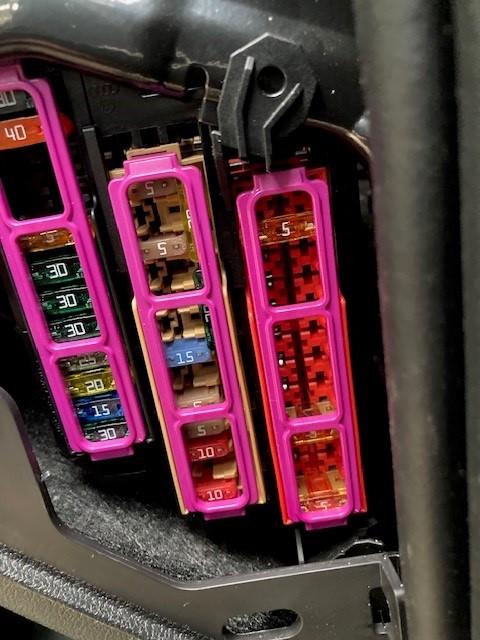
  3. The cigarette lighter has stopped working and I am struggling to locate the fuse. It's a 2017 A1 1.4TFSi. The manual suggests the fuse is a 20A fuse located in the end of the dashboard (RHD drivers side). When looking at where this fuse should be there is no fuse there and no wiring going to where it is stated it should be. Any body else had this problem and knows where the fuse is located please? photo shows the fuses. should be a 20A fuse below the 40A fuse (position no.3) Thanks Rob


Background Picker
Customize Layout

Account

Navigation

Search

Search

Configure browser push notifications

Chrome (Android)
  1. Tap the lock icon next to the address bar.
  2. Tap Permissions → Notifications.
  3. Adjust your preference.
Chrome (Desktop)
  1. Click the padlock icon in the address bar.
  2. Select Site settings.
  3. Find Notifications and adjust your preference.