letsonk
Members
-
Joined
-
Last visited
Everything posted by letsonk
-
Hi Vytas, just another question about the A4 B9 heater core replacement. See when re-filling with new coolant after you've changed the core, did you use any special tools like a vacum filler to refill it & bleed it? Or did you just pour it in slowly & start the engine & idle for a few minutes? Many thanks
-
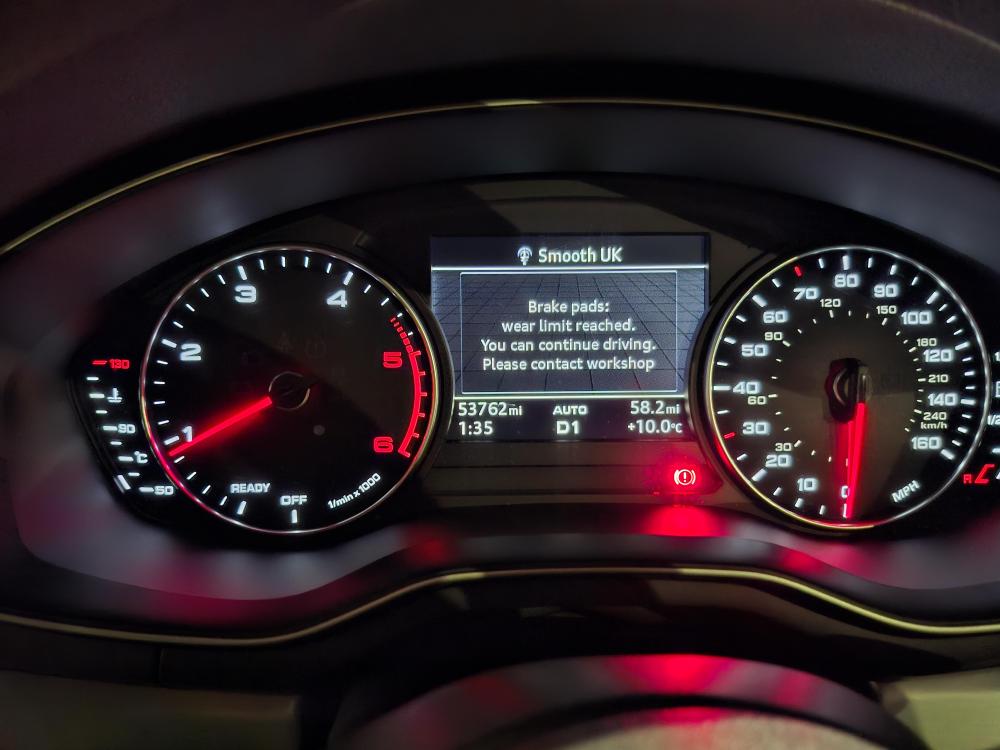
Hi can anyone help with this. I'm looking to code out the 'brake pad' wear limit reached message on dash. I managed to eliminate the orange brake light symbol when the message appears along with the audible by changing the long coding on VCDS but does anyone know where i can delete the message aswell on VCDS? New pads & discs fitted and also new genuine brake wear sensors but there seems to be that there might be a fault somewhere so im looking to de code it completley. See picture below of message and red warning light
-
Hi, has anyone changed a oil pump wet belt on a 2016 Audi A4 B9 2.0tdi (EA288 engine)? What is the recommended mileage or age for replacing it? Thanks
-
Hi Vytas, thanks for the speedy reply. So is the Nissens brand dead on to use? I see Parts in motion only have 1 left in stock of the Mahle one but wondering if its made in china & its £98, where as the Nissens one i can get for £66. So no more issues with the brand the you fitted? Thanks
-
Hi Vytas, removing glove box o.k to do and does the pollen filter compartment need moved or anything? I've been told that it's a ful dash removal for this heater core, clearly not