




Skip to content
View in the app

A better way to browse. Learn more.

Audi Owners Club (UK)

A full-screen app on your home screen with push notifications, badges and more.

To install this app on iOS and iPadOS
  1. Tap the Share icon in Safari
  2. Scroll the menu and tap Add to Home Screen.
  3. Tap Add in the top-right corner.
To install this app on Android
  1. Tap the 3-dot menu (⋮) in the top-right corner of the browser.
  2. Tap Add to Home screen or Install app.
  3. Confirm by tapping Install.


Welcome to the Audi Owners' Club - An Independent community!

Membership is completely free, and our community is built by enthusiasts, for enthusiasts. We’re a proudly independentnon-official club, so all the help and opinions you’ll find here come directly from members with real experience of Audi ownership.

Join the club now!
 

Newbie Here needing help with firmware and satnav maps

Featured Replies

Hi Everyone

I am new here so please be patent with me 🙂

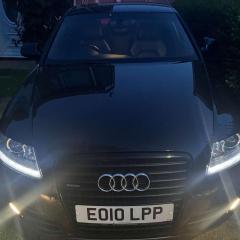
I bought an lovely Audi A6 2010 S-Line Le Mans Edition in Black and I love it 🙂

It have a 6 cd changer in the glove box + a dvd player with 2 SD card slots too for the Satnav, I tried to use the satnav but a voice kept saying it is not active and 0 Satellites shown so took the DVD disc out and it is the original that came with the car in 2010.

How do I update the firmware and maps for the car, I am also not sure what version of MMI I have 3G 4G High, Basic ETC

I have attached a screen shot on the software versions but it means nothing to me, any help would be much apricated. 

Regards 

Mark

IMG_9956.JPG

  • 5 months later...

Hi Mark, 

not an expert and not sure how much help can I be of, 

i went through this a few months back and found a useful picture detailing all types of mmi, from what i can see, you have the same as mine 3g low,(is not that bad) colours on the screen compared to my previous Audi. 😉

i tried to update my software and watched a few videos, followed the steps, downloaded the upgrade on a memory card and could not start it(needs pressing a few buttons at same time etc)I remember so I gave up at some point as my maps are a bit outdated but they work(compared to yours) also not really trusting the car gps when we have phones with more accuracy and different routes etc,

once I am done with my lights project, I will give it a go and try installing the software again and if I can make it work i send you the how to and all links


sorry for not having a solution asap. 

IMG_0014.jpeg

Create an account or sign in to comment


Background Picker
Customize Layout

Account

Navigation

Search

Search

Configure browser push notifications

Chrome (Android)
  1. Tap the lock icon next to the address bar.
  2. Tap Permissions → Notifications.
  3. Adjust your preference.
Chrome (Desktop)
  1. Click the padlock icon in the address bar.
  2. Select Site settings.
  3. Find Notifications and adjust your preference.