


Leaderboard
-
WPAWS
Established Member2Points1,717Posts -
niedzial1983
Established Member1Points1,264Posts -
-Tommo-
Members1Points3Posts -

Rogan
Members1Points2Posts


Popular Content
Showing content with the highest reputation on 07/19/2018 in Posts
-
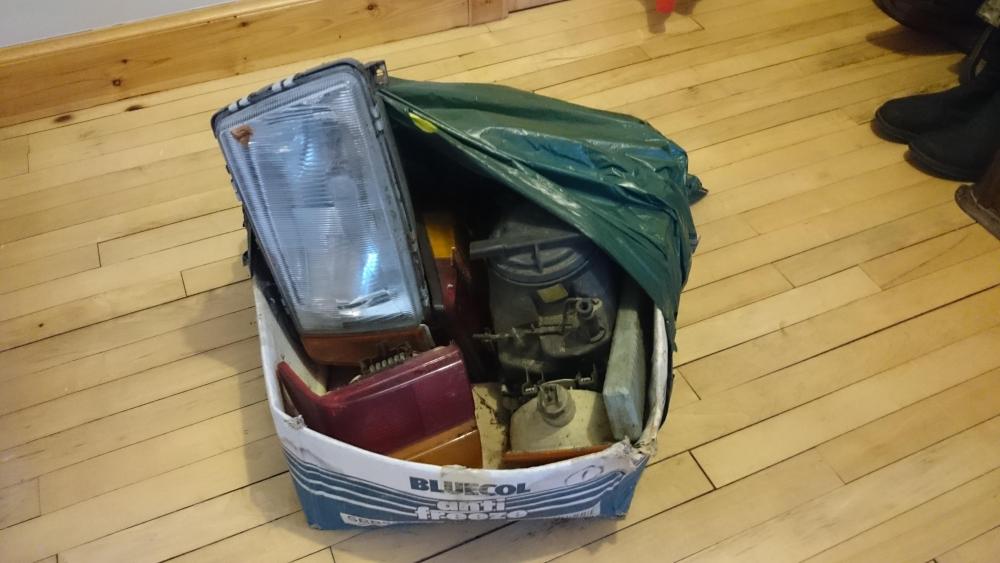
I've got some light units from I think a 1983 100. They've been sitting in a box for ages and I'm clearing out. They Free to anyone that wants them. Bulbs included - although not sure the condition of the bulbs. Based in Aberdeen - in Glasgow monthly.
 1 point
 -
1 pointhi Gareth,Audi major service for my car is £419, my local VW garage quoted somewhere around £260 but i know this is just the service no car inspection or vcds hook up, i am more inclined to use forces re-engineered as i believe my car will be looked after and being ex forces myself i can appreciate what they are trying to do1 point
-
1 pointWelcome to the forums Clay Nice friendly atmosphere here with plenty of Audi owners to help where they can. Please be sure to give the forum rules a quick view Paul1 point
-
1 pointDog handler in the Army 🙂 9and a half years and still going strong. Rc drift cars and having a tinker on my cars are what I like to do in my spare time.1 point
-
1 pointi had this for over a year but i never had time to post . as my central console was scratched so i bought of ebay carbon 4d wrap. there are 1000s of patterns and colours . it took me 2h to do it with my wife's hairdrayer :). i must have watched 100s youtube videos how to wrap prior. for me it looks so good and a fraction of a price for a new console how to take the console apart :1 point
-
0 pointsSorry to hear this Joe. It's infuriating when it happens, yet so easily done!0 points

