A7fan
Members
-
Joined
-
Last visited
Everything posted by A7fan
-
Hello Mark Enjoy your A7 - just be careful how you park, it's a monster! For the cable - either pay Audi £30 for the official part, or browse Amazon looking for "Audi Apple Cable" - there you will see several versions of the same thing for around £12. I downloaded all my music into the Audi A7 hard disc (they call it a "Jukebox") - saves having to plug the phone in.
-
Hi there. I'm unsure if the TPMS (Tyre Pressure Monitoring System) in my 2014 A7 is working. Looking at the MMI screen - "Car'. "Service & Checks", "TPMS" - the display then presents the option to store the current tyre pressure. If the option is selected, the display then reports "Pressures Stored".. Should the display then show an image of the a with four 'green' tyres ?? (Can't remember if this used to be the case, or was that on my previous car - which was not an Audi) Any advice welcomed, apart from "Ask A Main Dealer !! .
-
Hi there Real pain with the A7 is the lack of 'powerfold' mirrors. Question is - can I fold the mirrors by hand (when parking in a small garage for instance). I've never had the courage to wrestle the mirrors back, to see if they can be folded. Could be an expensive mistake if not!! Anyone else tried this??
-
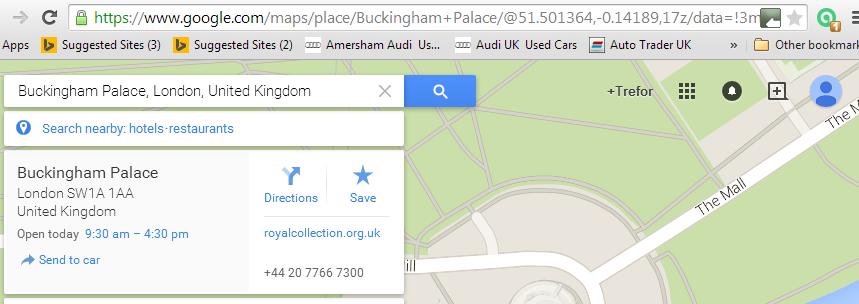
I use the The "Send To Car" option from Google Maps - lets me find the destination 'at leisure' on my PC then download it into the car sat nav. Tried to use it yesterday, first time in a couple of weeks - and fell straight into a trap that Google had created for the unwary! They've changed the Google Map system, you have to select a destination first before the 'send to' option appears. What is sneaky though is that: (a) you must use maps.google.com and NOT maps.google.co.uk and (b) Internet Explorer 9 no longer works, you must use Chrome ! See attached screen shot.... ****ing computers...
-
Hello there, I had exactly the same problem..... eventually found that the SIM worked OK for voice and texts but any data connection was blocked. After much head scratching and some help from the very helpful Asda Mobile people - the answers lie in the "Data Connection" settings in the Car MMI system. Note that some PAYG Sims do not include data. The internet connection details in the MMI have to be changed to precisely match the mobile phone Network - the APN Name, the User Name, and the Password all had to be changed,... I use an Asda Mobile SIM - as there is no monthly charge or limit, so a £10 top up lasts me months. Using Google Earth does clock up the data usage, but I use the head up display for navigation so don't use Google Earth. My local AUDI dealers were of no use..... Hope this helps!!