Stano
Members
-
Joined
-
Last visited
Everything posted by Stano
-
Just had computer plugged in, cylinder 1 and 4 misfiring. HT leads are all good, getting new spark plugs put in and hopefully that fixes it!
-
Hi to anyone still reading, had brand new battery put in the car today and the fault still persists with the limp mode and the ESP.
-
Thanks for the info, I'll get the battery tested and I'll update this thread with the outcome.
-
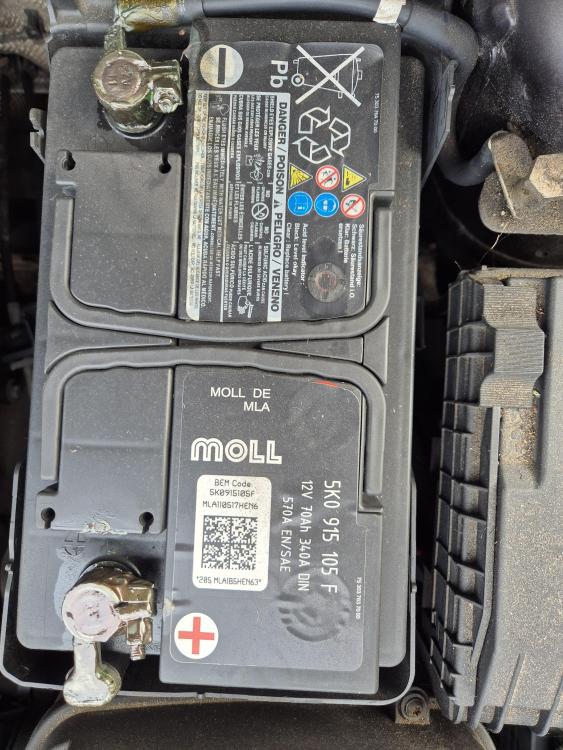
Hi Cliff thanks for the reply, I've attached a picture of the battery as I can't figure out how old it is, am I right in saying that these cars come with the battery from OEM? Also used a multimeter on the battery and it was reading 12.1V and dropped to 9V whilst starting it up. But the car always starts up first time every time?
-
Hi all newbie here, Had our A3 for around 2 and a half years now and never had a single issue with it and always been reliable compared to our other car being a Ford. But starting around 2 weeks ago it'll randomly go into limp mode with a ESP Fault showing on the dash screen, pull over and turn it off and back on and everything clears and will run fine for a few days until it'll do it again randomly out of nowhere. Just wondering if anyone else has had the same happen and possibly point us in the right direction to get it sorted as we love the car and don't want to get rid of it. Also it's a 1.6 8v MPI. Thank you for reading and will much appreciate any response.