Skip to content
View in the app

A better way to browse. Learn more.

Audi Owners Club (UK)

A full-screen app on your home screen with push notifications, badges and more.

To install this app on iOS and iPadOS
  1. Tap the Share icon in Safari
  2. Scroll the menu and tap Add to Home Screen.
  3. Tap Add in the top-right corner.
To install this app on Android
  1. Tap the 3-dot menu (⋮) in the top-right corner of the browser.
  2. Tap Add to Home screen or Install app.
  3. Confirm by tapping Install.


Bun

Members
  • Joined

  • Last visited

Everything posted by Bun

  1. Bun replied to Bun's topic in Audi A4 (B8) Forum
    Thank you!
  2. WANTED set of four glow plug connectors for A4 b8 avant diesel. Anyone breaking their diesel?
  3. Bun posted a topic in Audi A4 (B8) Forum
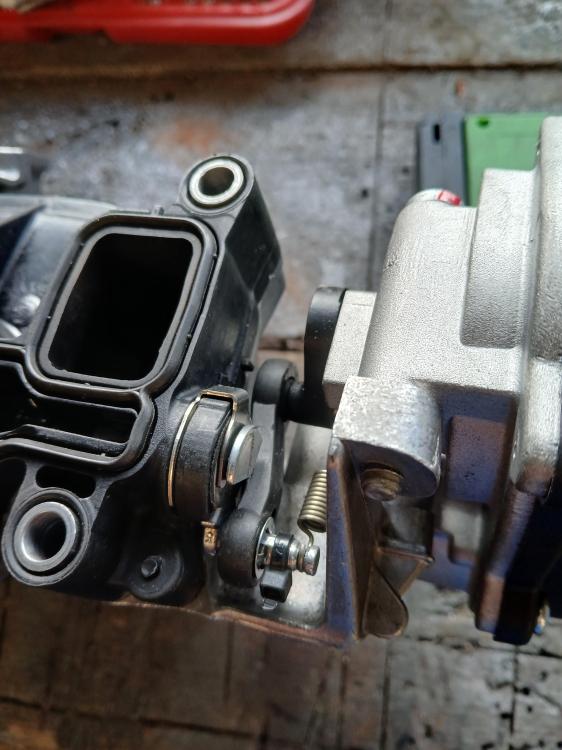
    Hi all Just a quick tip I thought to share for ANY actuator link arm which is worn . I was getting the famous p2015 fault code 'actuator in unexpected position', mine was caused by a worn actuator motor link arm which was flapping about on its rod due to it being worn and very loose. I fixed it by pushing on a star lock washer and a small cable tie for added security. Works a treat and a very cheap fix for this issue.
  4. Bun replied to Bun's topic in Audi A4 (B8) Forum
    I had the whole inlet manifold off to clean the carbon off the swirl flaps so it was a fairly easy job to remove the plugs. Very well buried in the head, these things. I am surprised that audi didn't make them even more inaccessible..
  5. Bun replied to Bun's topic in Audi A4 (B8) Forum
    Thank you for the reply! I have changed the glow plugs out for bosch, they came out quite easily with a ten mill long reach socket but diagnostics still come up with the plug 4 fault. I reckon the wiring needs replacing. I did vacuum the bores out before removal of the old. Looking to find a new glow plug harness then. Big bucks...
  6. Hello, easy one this (I suppose) I have the flashing glow coil light on the dash, diagnostic says that there's an issue with No.4 glow plug. Is this the one nearest the front? Thank you in advance


Background Picker
Customize Layout

Account

Navigation

Search

Search

Configure browser push notifications

Chrome (Android)
  1. Tap the lock icon next to the address bar.
  2. Tap Permissions → Notifications.
  3. Adjust your preference.
Chrome (Desktop)
  1. Click the padlock icon in the address bar.
  2. Select Site settings.
  3. Find Notifications and adjust your preference.