




Skip to content
View in the app

A better way to browse. Learn more.

Audi Owners Club (UK)

A full-screen app on your home screen with push notifications, badges and more.

To install this app on iOS and iPadOS
  1. Tap the Share icon in Safari
  2. Scroll the menu and tap Add to Home Screen.
  3. Tap Add in the top-right corner.
To install this app on Android
  1. Tap the 3-dot menu (⋮) in the top-right corner of the browser.
  2. Tap Add to Home screen or Install app.
  3. Confirm by tapping Install.

Welcome to the Audi Owners' Club - An Independent community!

Membership is completely free, and our community is built by enthusiasts, for enthusiasts. We’re a proudly independentnon-official club, so all the help and opinions you’ll find here come directly from members with real experience of Audi ownership.

Join the club now!
 

New Member from Uruguay

Featured Replies

Hello to all on the Forum.   

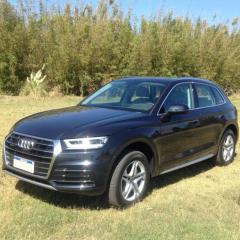
Quick intro, I am in the process of buying a Q5 due to take delivery 1st Feb 2020 . Currently living in Montevideo, Uruguay but I originate from the Northwest, UK, a Lancashire boy. 

If there any other members located near to me then please get in touch, or if anybody is travelling to this part of the world say hello.   Thanks mvfjps

  • Author

Trevor. 

Thank you.

When the vehicle gets here I will take some pics and post them...It would be interesting to see how the spec may vary for a vehicle sold here...there were very few to choose from....and  only a few arrive every  couple of months.

I know it was the case as we had a Nissan X Trail, full spec, 7 seater and that was  a different spec to those sold in Europe. I dont think they have the certificate of conformity that allows them to be registered in Europe... we will see.  thanks again 

  • 2 months later...
  • Author

Car Finally arrived, it will take a  while to work out how everything works on this vehicle.  So many different functions and switches.   

8da50f90-b4bd-452b-ad09-4df92f04aad1.JPG

dcc46f3a-77ce-420c-b72f-479613d17061.JPG

  • Author

Thanks Trevor,  it is quite swift,,,, more so than I thought.   

Create an account or sign in to comment


Background Picker
Customize Layout

Account

Navigation

Search

Search

Configure browser push notifications

Chrome (Android)
  1. Tap the lock icon next to the address bar.
  2. Tap Permissions → Notifications.
  3. Adjust your preference.
Chrome (Desktop)
  1. Click the padlock icon in the address bar.
  2. Select Site settings.
  3. Find Notifications and adjust your preference.