


Leaderboard
-
jdragon
Established Member1Points349Posts -
Magnet
Moderators1Points9,550Posts -
cliffcoggin
Moderators1Points4,643Posts -
Jaws
Members1Points2Posts


Popular Content
Showing content with the highest reputation on 03/19/2023 in Posts
-
1 pointDid you get the new battery coded to the car? Unless you do you will still get a variety of error codes and faults.1 point
-
1 pointHello Chris, Still under warranty I guess -? If so, I would not be bothering to enquire whether anyone else has had a similar issue, but simply booking it into Audi to get the problem resolved. Kind regards, Gareth.1 point
-
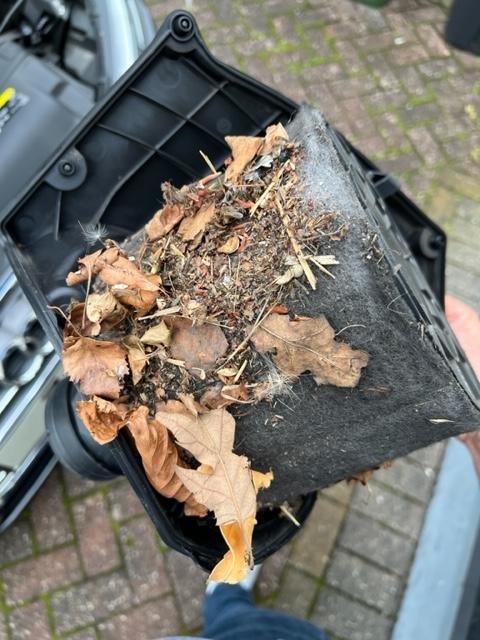
1 pointReplaced mine this week after its Audi service. Surprise, surprise another thing not included in their 'service plan'. Anyway, they quoted £48 to supply and fit but I bought the filter myself from ECP for £25 and spent 10 mins to fit. I have very little mechanical knowledge and it's quite easy. Unclip Maf Loosen the pipes from holders on airbox Undo Torx Screws Remove filter Filter twists off, although after 5 mins of fighting thinking it was stuck there's a small tab which you need to press to release it. Hoover out airbox Replace via reverse. Pics of mine, not sure if ever replaced and the car was on 76k so well overdue by the look of it!
 1 point
 -
1 pointSecond the MPG comments here 😀 I'm getting high 70s from my A5 190 Ultra over a 40 minute drive of A roads
 1 point
 -
0 pointsWell, just had diagnostic check at local dealer. Its not good news p200200 is the egr cooler. Make sure your sat down, repair cost £2k 😢😫0 points


