





F360boy
Members
-
Joined
-
Last visited
Everything posted by F360boy
-
Would the allroad air suspension fit?
-
I have 235s on mine, but wheels are 7.5j. If yours are only 7j then the 225s are a safer bet. As well as potentially stretching the tyres too far, they could end up rubbing on the inside somewhere.
-
Not sure on dipstick issue, but stereo needs special tools - ebay or amazon - depending on model. For the symphony it needs 4 "keys" to release the radio and pull it out.
-
Anyone fitted an Allroad bumper to a standard avant? I cant seem to find a replacement rear one for my 3.0 v6 petrol, but there are plenty of allroad 2.5tdi ones about. Do the exhaust cut outs line up? Bodywork looks the same so I am guessing its a straight swap.
-
-
No info to help you on the car, but I have 3 of those wheels in decent nick if you need any spares. They don't show up on ebay often, so seem to be quite rare.
-
Sorry, I hope you find a solution.
-
I bought one for my A6 and its excellent. Ebay or Amazon sell them, it's from Anycar and the version I bought has aux, usb, SD and bluetooth ( with handsfree) . It connects to the back of the stereo, easily done and works reliably too.
-
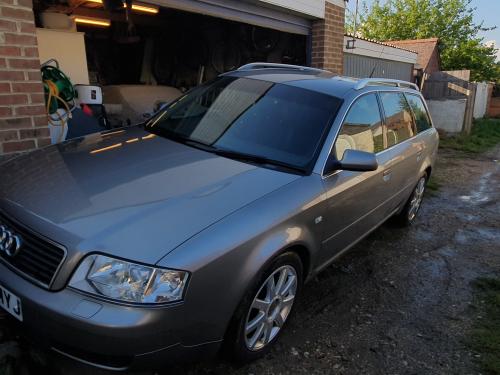 She has some rust on the front arches, scrapes here and there- rear bumper is beyond repair, but mechanically solid with less than 80k on her. Just driven to the Dordogne and even squeezed 30mpg on the way. Body and wheels will be sorted. Interior is now pristine after vacuuming and steam cleaning. Only mod so far is bluetooth/sd/usb adaptor with hand free which works brilliantly.
 -
This is my 2003 A6 3.0 quattro sport avant.