




Skip to content
View in the app

A better way to browse. Learn more.

Audi Owners Club (UK)

A full-screen app on your home screen with push notifications, badges and more.

To install this app on iOS and iPadOS
  1. Tap the Share icon in Safari
  2. Scroll the menu and tap Add to Home Screen.
  3. Tap Add in the top-right corner.
To install this app on Android
  1. Tap the 3-dot menu (⋮) in the top-right corner of the browser.
  2. Tap Add to Home screen or Install app.
  3. Confirm by tapping Install.


Welcome to the Audi Owners' Club - An Independent community!

Membership is completely free, and our community is built by enthusiasts, for enthusiasts. We’re a proudly independentnon-official club, so all the help and opinions you’ll find here come directly from members with real experience of Audi ownership.

Join the club now!
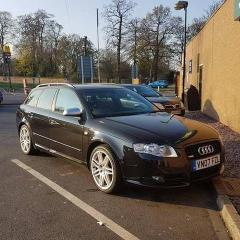
 

chugging 2.0TDI 140bhp

Featured Replies

so love my Audi's currently have 2 A4's both Sline 1 off 220bhp quattro Avant and 1 off 140bhp tdi saloon both great cars but just lately the tdi has started to chug under light acceleration. if I boot it, it's fine and pulls really well, black smoke as expected but this does clear after a couple of goes. My thinking is that there is carbon build up on the injectors I've run a fuel additive but so far only in 1 tank of fuel.

my question is before I start looking at stripping down and removing and cleaning the injectors would a carbon clean/terraclean help this? has anyone used one of these and if so was it worth it?


cheers for looking I'm sure this question will have been asked before?

Dave

Hi Dave,

I am having a carbon clean later this morning funnily enough so will let you know how it goes.

Shaun.

  • Author
8 hours ago, Biggsy1989 said:

Hi Dave,

I am having a carbon clean later this morning funnily enough so will let you know how it goes.

Shaun.

oh cool 🙂 how did it go?

Create an account or sign in to comment


Background Picker
Customize Layout

Account

Navigation

Search

Search

Configure browser push notifications

Chrome (Android)
  1. Tap the lock icon next to the address bar.
  2. Tap Permissions → Notifications.
  3. Adjust your preference.
Chrome (Desktop)
  1. Click the padlock icon in the address bar.
  2. Select Site settings.
  3. Find Notifications and adjust your preference.