




Skip to content
View in the app

A better way to browse. Learn more.

Audi Owners Club (UK)

A full-screen app on your home screen with push notifications, badges and more.

To install this app on iOS and iPadOS
  1. Tap the Share icon in Safari
  2. Scroll the menu and tap Add to Home Screen.
  3. Tap Add in the top-right corner.
To install this app on Android
  1. Tap the 3-dot menu (⋮) in the top-right corner of the browser.
  2. Tap Add to Home screen or Install app.
  3. Confirm by tapping Install.


Welcome to the Audi Owners' Club - An Independent community!

Membership is completely free, and our community is built by enthusiasts, for enthusiasts. We’re a proudly independentnon-official club, so all the help and opinions you’ll find here come directly from members with real experience of Audi ownership.

Join the club now!
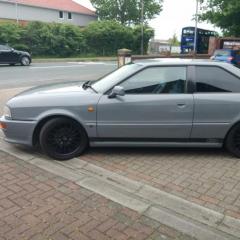
 

Audi coupe 2.3E 10v. 1991 FOR SALE

Featured Replies

Just Spent £600 For MOT.
Don’t see many of these about any more. Here’s You chance of owning a stunning Audi coupe 2.3. Outside clean & tidy real head turner. Couple of scrapes 1 on mirror 1 on front bumper see photos also got little tiny hole near side wing.
Got all paper for this car book full. Old Mot service history. Welcome to come have a look before bidding by appointment only as I work.
Any Q message me car location DH4 just up from Chester le street Durham 07919458023
Thanks for looking.

AF95E768-1834-4F1D-B61D-82A23DA90A0A.jpeg

E366BD28-049C-4D86-8786-C707CFF293B1.jpeg

EAC0F8DA-4EAE-4F49-8582-52E93A6557B8.jpeg

D33A12FA-A76B-4B2A-8924-7AF936FB37EF.jpeg

CB585853-0960-4110-8F7D-EAAFB4E92A68.jpeg

934C7C8F-5D39-401B-9DBC-881275C78305.jpeg

50277A24-7DB7-43F3-8AE2-CE33D2B94034.jpeg

22C7DAD4-3902-4D33-94DA-F86D9E8A1F2D.jpeg

64D13FF7-3C0A-4FDD-8544-B87BD0054EDD.jpeg

Create an account or sign in to comment


Background Picker
Customize Layout

Account

Navigation

Search

Search

Configure browser push notifications

Chrome (Android)
  1. Tap the lock icon next to the address bar.
  2. Tap Permissions → Notifications.
  3. Adjust your preference.
Chrome (Desktop)
  1. Click the padlock icon in the address bar.
  2. Select Site settings.
  3. Find Notifications and adjust your preference.