




Skip to content
View in the app

A better way to browse. Learn more.

Audi Owners Club (UK)

A full-screen app on your home screen with push notifications, badges and more.

To install this app on iOS and iPadOS
  1. Tap the Share icon in Safari
  2. Scroll the menu and tap Add to Home Screen.
  3. Tap Add in the top-right corner.
To install this app on Android
  1. Tap the 3-dot menu (⋮) in the top-right corner of the browser.
  2. Tap Add to Home screen or Install app.
  3. Confirm by tapping Install.

Welcome to the Audi Owners' Club - An Independent community!

Membership is completely free, and our community is built by enthusiasts, for enthusiasts. We’re a proudly independentnon-official club, so all the help and opinions you’ll find here come directly from members with real experience of Audi ownership.

Join the club now!
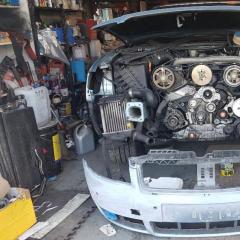
 

Continuing info on missfire any experts out there

Featured Replies

Hi  Guys  as  a continuation from  my last post  .Is anyone aware of a source  where  i  may  get an answer  probably  best  for a well clued up  audi  guy .  Maybe  a garage  🙂

 Ive  been out today  and the missfire/cut out  appears consistantly while  accelerating thru   1175 rpm as soon as  i hit 1175  it cuts  out     if  i avoid that  area  by  changing gear at strategic times  ,it runs  perfectly  .Any  pointers  greatly appreciated .

Heres  are  latest fault codes  after  the run  out  .i cleared them yesterday  --

Address 01: Engine       Labels: 059-907-401-AKE.LBL
   Controller: 8E0 907 401 T
   Component:  2.5l V6 TDI 0000SG  0007
   Coding: 07002
   Shop #: WSC 18424
   VCID: 361FA5DB015F
   00008XS4Q9A543EE
1 Fault Found:
00550 -  Start of Injection Regulation
            08-10 -  Control Limit Surpassed - Intermittent
Readiness: N/A

Thanks for looking 

  • 1 month later...

It is definitely a timing issue, yours is the type with the high pressure fuel pump in the V at the top front of the engine? If so I would time it all up and see if the pump timing is out. If it is, adjust it and recheck.

Create an account or sign in to comment


Background Picker
Customize Layout

Account

Navigation

Search

Search

Configure browser push notifications

Chrome (Android)
  1. Tap the lock icon next to the address bar.
  2. Tap Permissions → Notifications.
  3. Adjust your preference.
Chrome (Desktop)
  1. Click the padlock icon in the address bar.
  2. Select Site settings.
  3. Find Notifications and adjust your preference.