




Skip to content
View in the app

A better way to browse. Learn more.

Audi Owners Club (UK)

A full-screen app on your home screen with push notifications, badges and more.

To install this app on iOS and iPadOS
  1. Tap the Share icon in Safari
  2. Scroll the menu and tap Add to Home Screen.
  3. Tap Add in the top-right corner.
To install this app on Android
  1. Tap the 3-dot menu (⋮) in the top-right corner of the browser.
  2. Tap Add to Home screen or Install app.
  3. Confirm by tapping Install.


Welcome to the Audi Owners' Club - An Independent community!

Membership is completely free, and our community is built by enthusiasts, for enthusiasts. We’re a proudly independentnon-official club, so all the help and opinions you’ll find here come directly from members with real experience of Audi ownership.

Join the club now!
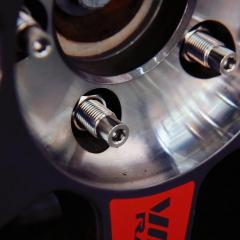
 

Blue car, sliver wheels, purple bolts

Featured Replies

The literal explanation of “stance” is attitude and standpoint, which first appeared in the names of some modified car parties and clubs. Generally speaking, it refers to those who try their best to lower the body, let the car lie down to the maximum, and present the most beautiful side of the car, or it can be understood as an attitude of playing with the car. Whether it is a pneumatic suspension or a shock absorber, whether it is HellaFlush or VIP, it is all about presenting the ultimate side of the car.

spacer.png

spacer.png

Through the modification of body kit, shock absorber, hub display perfect body stance, this Audi A6 is realized, low-key elegant temperament can be reflected in the hub parts, KW HAS can adjust the height of the short spring, raise or lower body height, wheel bolts make hub low-key temperament a little publicity, blue body with purple bolts, silver hub complement each other.

Quote from: https://www.bonoss.com/bonoss-forged-grade-12-9-shell-type-lock-bolt-kit-purple-for-audi-a6-by-xu.html

Create an account or sign in to comment


Background Picker
Customize Layout

Account

Navigation

Search

Search

Configure browser push notifications

Chrome (Android)
  1. Tap the lock icon next to the address bar.
  2. Tap Permissions → Notifications.
  3. Adjust your preference.
Chrome (Desktop)
  1. Click the padlock icon in the address bar.
  2. Select Site settings.
  3. Find Notifications and adjust your preference.