Skip to content
View in the app

A better way to browse. Learn more.

Audi Owners Club (UK)

A full-screen app on your home screen with push notifications, badges and more.

To install this app on iOS and iPadOS
  1. Tap the Share icon in Safari
  2. Scroll the menu and tap Add to Home Screen.
  3. Tap Add in the top-right corner.
To install this app on Android
  1. Tap the 3-dot menu (⋮) in the top-right corner of the browser.
  2. Tap Add to Home screen or Install app.
  3. Confirm by tapping Install.


Leaderboard

Popular Content

Showing content with the highest reputation on 08/20/2020 in all areas

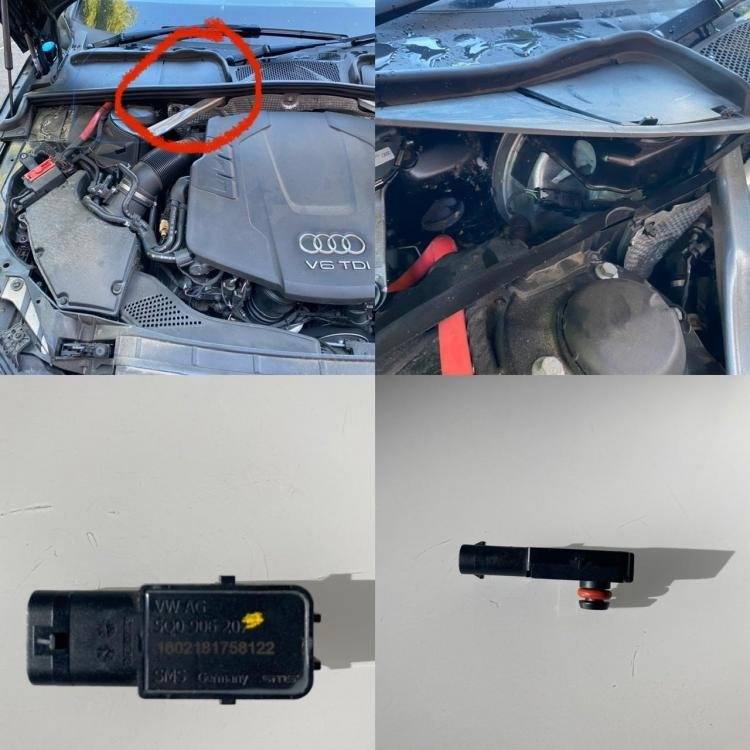
  1. Hope this helps. I’ve circled in red the area of the sensor. It’s under a plastic flap. You have to pull the rubber edge off to lift up. The sensor pulls vertically off. You then slide a plastic holding clamp off the other end. Just reverse the process to put the new one back in. It’s really simple and annoying that everyone seems to want to charge a couple of hundred pounds for this??!?
  2. Sounds like you've got good grounds for rejection abd if it's been accepted then you have nothing to lose 👍


Background Picker
Customize Layout

Account

Navigation

Search

Search

Configure browser push notifications

Chrome (Android)
  1. Tap the lock icon next to the address bar.
  2. Tap Permissions → Notifications.
  3. Adjust your preference.
Chrome (Desktop)
  1. Click the padlock icon in the address bar.
  2. Select Site settings.
  3. Find Notifications and adjust your preference.
