


Leaderboard
-
Magnet
Moderators1Points9,550Posts -
Jinxit
Members1Points11Posts -
Simon Ryder
Members1Points4Posts -
Roddy Mac
Members1Points3Posts


Popular Content
Showing content with the highest reputation on 04/21/2021 in all areas
-
1 pointMany thanks Jill. Plenty of reading on the forum regarding this. Kind regards, Gareth.1 point
-
1 pointI don't know about the TFSI e but I have a 2020 40 TDI which is a mild hybrid and I ordered the space saver wheel. It fits in the boot with the sub speaker inside it. It did mean I had to have a factory order rather than a stock car but in my opinion that was worth the wait.1 point
-
1 pointHello, I’m new to this forum. I only discovered it yesterday after searching for a solution when both the brake servo restricted and stop/start warnings came on. I was hugely impressed with the amount of information and advice here. I have a late 2018 Q5 S Line. Armed with this info, I contacted my local dealership who made a preliminary booking for the 29 April but recommended that I phone Audi Assist who would get my car seen far quicker if they could not resolve the matter at my home. I did this and they were out within an hour. The technician said his last job had been for exactly the same issue and he had used his last spare sensor for that. He confirmed the diagnosis and went away to collect a new sensor which he said had a different letter code in front of the number which indicated it was updated. He was back in an hour and fitted it. Job done. Excellent service. Thank everyone for your help. Roddy.1 point
-
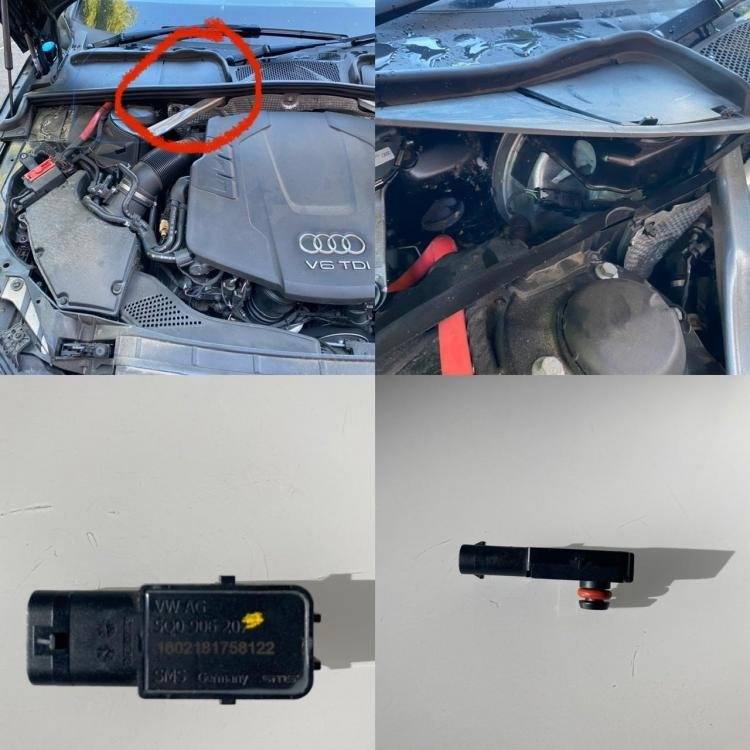
1 pointHope this helps. I’ve circled in red the area of the sensor. It’s under a plastic flap. You have to pull the rubber edge off to lift up. The sensor pulls vertically off. You then slide a plastic holding clamp off the other end. Just reverse the process to put the new one back in. It’s really simple and annoying that everyone seems to want to charge a couple of hundred pounds for this??!?
 1 point
