


Leaderboard
-

Steve Q
Moderators1Points15,243Posts -
Francis007
Established Member1Points67Posts -
Jona1
Members1Points2Posts




Popular Content
Showing content with the highest reputation on 05/22/2024 in all areas
-
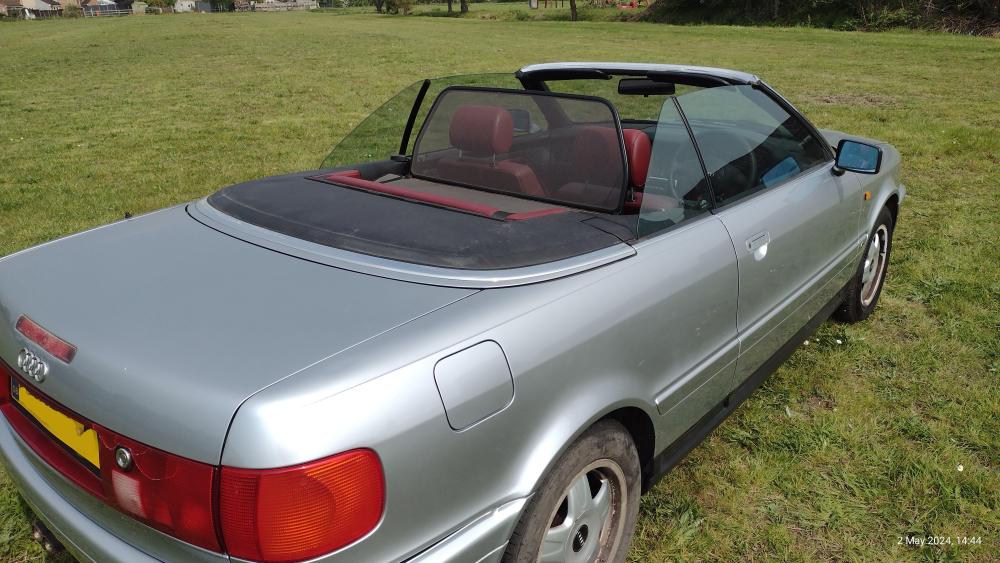
1 point1996 2.6 107,000 miles Runs very well just a bit tatty. Rear window needs replacing , has abs light on dash (could just be a sensor or could be pump) brakes work but no abs, Heater inoperative and tear in seat,crack in rear light cluster. Nice project if you have time or many spare parts. £600 ono


 1 point
 -
1 pointMorning Brad. I have a 23 plate Q8 55Tfsi. It has cruise control but not the adaptive cruise control that your friend has on his car. I suspect that the issue with the lane departure is to do with that. There must be an overlap of the systems somewhere. I would hazard a guess that you would need to disconnect the adaptive cruise control before you are able to turn off the lane assist. Just a guess but maybe you will have to delve deeper into the info folder that came with the car. On a general point I too turn off the lane assist whenever I drive my car. In fact it's the first thing I do! An absolutely useless piece of kit and I think I have read a survey recently that 83 % of all owners who have lane assist on their cars,do likewise. Frank1 point
-
1 point


