




Skip to content
View in the app

A better way to browse. Learn more.

Audi Owners Club (UK)

A full-screen app on your home screen with push notifications, badges and more.

To install this app on iOS and iPadOS
  1. Tap the Share icon in Safari
  2. Scroll the menu and tap Add to Home Screen.
  3. Tap Add in the top-right corner.
To install this app on Android
  1. Tap the 3-dot menu (⋮) in the top-right corner of the browser.
  2. Tap Add to Home screen or Install app.
  3. Confirm by tapping Install.

Welcome to the Audi Owners' Club - An Independent community!

Membership is completely free, and our community is built by enthusiasts, for enthusiasts. We’re a proudly independentnon-official club, so all the help and opinions you’ll find here come directly from members with real experience of Audi ownership.

Join the club now!
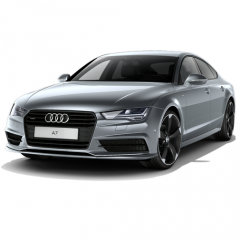
 

Audi bulletin: Coolant leak/ total loss of coolant

Featured Replies

And so continues the saga...A Heads up folks if you are not already aware

Went to get in the car on Sunday last, press the shiny button and ‘bing’ warning low coolant message appears - and you now G12 doesn’t exist in local motor factors - which apparently is the only coolant you are supposed to use or you invalidate the warranty.

Popped the bonnet, looking at the bottle it looks a little low, unscrewed the cap and there was absolutely nothing in there, its seems some residual pink fluid sits in the tiny mouldings at the front of the coolant bottle - could have easily fooled me

Anyway after a week or so in the dealership I get a call saying as I now have an approved Audi warranty only  I may have to pay for the diagnostic (inspection) of the vehicle if the issue is not covered 😞

Luckily for me I guess as it turns out there has been an Audi recall/ bulletin regarding coolant loss on A7’s. it may appear like this..see video.

AA man got out his telescopic mirror and could see liquid dripping at the bottom of the engine, black water substance.

He also noticed the same fluid appearing just in the ‘V' of the engine - popped the cover off and shone the torch in amongst the pipes.


Create an account or sign in to comment


Background Picker
Customize Layout

Account

Navigation

Search

Search

Configure browser push notifications

Chrome (Android)
  1. Tap the lock icon next to the address bar.
  2. Tap Permissions → Notifications.
  3. Adjust your preference.
Chrome (Desktop)
  1. Click the padlock icon in the address bar.
  2. Select Site settings.
  3. Find Notifications and adjust your preference.