




Skip to content
View in the app

A better way to browse. Learn more.

Audi Owners Club (UK)

A full-screen app on your home screen with push notifications, badges and more.

To install this app on iOS and iPadOS
  1. Tap the Share icon in Safari
  2. Scroll the menu and tap Add to Home Screen.
  3. Tap Add in the top-right corner.
To install this app on Android
  1. Tap the 3-dot menu (⋮) in the top-right corner of the browser.
  2. Tap Add to Home screen or Install app.
  3. Confirm by tapping Install.

Welcome to the Audi Owners' Club - An Independent community!

Membership is completely free, and our community is built by enthusiasts, for enthusiasts. We’re a proudly independentnon-official club, so all the help and opinions you’ll find here come directly from members with real experience of Audi ownership.

Join the club now!
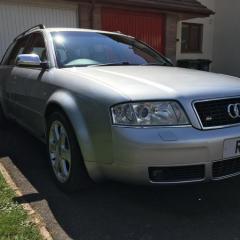
 

Audi A4 Avant 1.8t rare Quattro S line (190)

Featured Replies

Bose sound system 

Heated half leather

Cool box in the glove box (factory optional extra)  

Cruise control

Wheels recently refurbished 

Two keys

Full stamped service history 

Mot August 2020  


Bad bits all cars have them!


Parking sensors are intermittent,

Couple of marks on front bumper, 

Rear near side quarter panel the lacquer has started crazing as pictured,

Bulb light on dash won’t go out even know there’s no bulbs blown, as far as I’m aware there wasn’t may avant 1.8t s lines made but even rarer with the option to be Quattro Audi’s world renowned four wheel drive system, I honestly think you will be hard pushed to find another one for this price in this condition and mileage iv found a similar one one eBay but it’s the 163bhp and in a poor condition indeed for £2795.

£2650 Ono 

68ED6593-235E-4471-9EC7-C31148465E79.jpeg

A3488C50-3914-4306-9EB1-11FD55115873.jpeg

E473C881-BAC1-4DDF-94C5-446BE9D29D67.jpeg

4BF2FB89-877A-4B18-93F3-8726352F1188.jpeg

98A34369-5C61-47FE-80B9-EEBFF67C4264.jpeg

6D733A17-6B2A-4AF6-BAA3-EFCC771C37D5.jpeg

580099F7-EC1A-4701-9548-572C5E22DC45.jpeg

2D93DE5C-F993-4916-977B-A61B962E1B76.jpeg

6C506F18-6E6F-4FEB-A6EA-47CB841F9798.jpeg

Create an account or sign in to comment


Background Picker
Customize Layout

Account

Navigation

Search

Search

Configure browser push notifications

Chrome (Android)
  1. Tap the lock icon next to the address bar.
  2. Tap Permissions → Notifications.
  3. Adjust your preference.
Chrome (Desktop)
  1. Click the padlock icon in the address bar.
  2. Select Site settings.
  3. Find Notifications and adjust your preference.