




Skip to content
View in the app

A better way to browse. Learn more.

Audi Owners Club (UK)

A full-screen app on your home screen with push notifications, badges and more.

To install this app on iOS and iPadOS
  1. Tap the Share icon in Safari
  2. Scroll the menu and tap Add to Home Screen.
  3. Tap Add in the top-right corner.
To install this app on Android
  1. Tap the 3-dot menu (⋮) in the top-right corner of the browser.
  2. Tap Add to Home screen or Install app.
  3. Confirm by tapping Install.


Welcome to the Audi Owners' Club - An Independent community!

Membership is completely free, and our community is built by enthusiasts, for enthusiasts. We’re a proudly independentnon-official club, so all the help and opinions you’ll find here come directly from members with real experience of Audi ownership.

Join the club now!
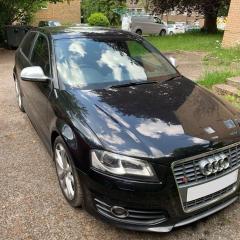
 

2009 S3 8P Facelift

Featured Replies

For sale is my Audi S3 Quattro, very well looked after full service history with reciprts for cam belt, chain, clutch by previous owner . Very high spec, Bose speakers, xenons, electric folding wing mirrors, heated seats, embossed nappa leather. Cruise control, factory parking sensors, tyre pressure monitoring system.
 
 
Selling as it just doesn’t get used, done 2k in a year pointless being sat there on the drive. Recent new disc and pads all round (brembo + ds2500) Brand new set of Michelin pilot sport 4 less than 500 miles on them.
 
 
Location newport south wales
 
07935002878
 
£6250 ono
 
94889258-3551664821515264-40088882861467
94779302-3551664828181930-26366844302188
95266807-3551664878181925-14878602642828
95589261-3551664861515260-70309646458463
95886165-3551665041515242-42034929966304
95260849-3551665044848575-53129373118040
95289721-3551665058181907-15308626236067
95600055-3551665071515239-33513362234225
95606791-3551665291515217-82049965589581
  • Author

Price drop £6000

  • 3 weeks later...
  • Author

Sold please delete 

Create an account or sign in to comment


Background Picker
Customize Layout

Account

Navigation

Search

Search

Configure browser push notifications

Chrome (Android)
  1. Tap the lock icon next to the address bar.
  2. Tap Permissions → Notifications.
  3. Adjust your preference.
Chrome (Desktop)
  1. Click the padlock icon in the address bar.
  2. Select Site settings.
  3. Find Notifications and adjust your preference.