




Skip to content
View in the app

A better way to browse. Learn more.

Audi Owners Club (UK)

A full-screen app on your home screen with push notifications, badges and more.

To install this app on iOS and iPadOS
  1. Tap the Share icon in Safari
  2. Scroll the menu and tap Add to Home Screen.
  3. Tap Add in the top-right corner.
To install this app on Android
  1. Tap the 3-dot menu (⋮) in the top-right corner of the browser.
  2. Tap Add to Home screen or Install app.
  3. Confirm by tapping Install.


Welcome to the Audi Owners' Club - An Independent community!

Membership is completely free, and our community is built by enthusiasts, for enthusiasts. We’re a proudly independentnon-official club, so all the help and opinions you’ll find here come directly from members with real experience of Audi ownership.

Join the club now!
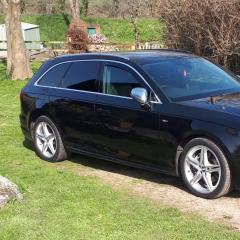
 

Audi A4 Avant 2016 66 S line Ultra S-Tronic for sale

Featured Replies

Hi.

This may be for sale shortly, depending on acceptance of new job with company car.

Just putting early feelers out really, to see if anyone may be interested.

Can always add photos and more details later.

Was not expecting to look to sell, so recently replaced brake discs and pads and tyres, including  brake fluid change and thus car needs absolutely nothing doing to it.

74000 miles. Full Audi service history. Just passed mot, has 1 year and two weeks on certificate.

Cam belt and tensioner and water pump replaced by Audi at approx 70000.

Auto gearbox oil replaced by Audi.

Recent discs and pads all round.

Recent tyres. Virtually new on front. Extremely good on back.

Black metallic paint.

Facelift model....led lights, dynamic rear indicators, all usual S-line refinements. Alloys in amazing condition.

190bhp engine. Lovely car, maintained through business so no expense spared. All Audi receipts.

Well looked after car. 

Owned from 46500 miles, Sept 2020,  all motorway/dual carriageway type miles.


Edited by Pepper
Info added

Create an account or sign in to comment


Background Picker
Customize Layout

Account

Navigation

Search

Search

Configure browser push notifications

Chrome (Android)
  1. Tap the lock icon next to the address bar.
  2. Tap Permissions → Notifications.
  3. Adjust your preference.
Chrome (Desktop)
  1. Click the padlock icon in the address bar.
  2. Select Site settings.
  3. Find Notifications and adjust your preference.