




Skip to content
View in the app

A better way to browse. Learn more.

Audi Owners Club (UK)

A full-screen app on your home screen with push notifications, badges and more.

To install this app on iOS and iPadOS
  1. Tap the Share icon in Safari
  2. Scroll the menu and tap Add to Home Screen.
  3. Tap Add in the top-right corner.
To install this app on Android
  1. Tap the 3-dot menu (⋮) in the top-right corner of the browser.
  2. Tap Add to Home screen or Install app.
  3. Confirm by tapping Install.

Welcome to the Audi Owners' Club - An Independent community!

Membership is completely free, and our community is built by enthusiasts, for enthusiasts. We’re a proudly independentnon-official club, so all the help and opinions you’ll find here come directly from members with real experience of Audi ownership.

Join the club now!
 

Wheels!!!

Featured Replies

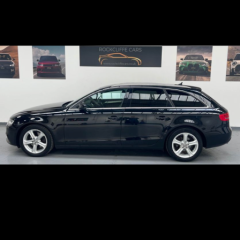
New to Audi and this forum. I have just bought an A4 B8 Avant 2014 teknik. Has 17" alloys on. But bought some 18" rotors. And you know the score. They don't fit! 66.6mm hub and 57.1mm wheel centres! What have you lot done to get fer round this!?? Spacers obvious solution, but what size spacers? Don't want then sticking out! 7.5J et54, hubs stick out about 15mm. So guessing 15mm at the minimum. Thanks in advance, 

PXL_20230722_153235837.jpg

i personaly dont know the answer lee, but welcome to the forum from a fellow yorkshire man👍😁

  • Author
3 minutes ago, alpha omega said:

i personaly dont know the answer lee, but welcome to the forum from a fellow yorkshire man👍😁

Thank you. 👍

  • Author
1 hour ago, JMKC82 said:

Hi thanks for your reply. My hub on the car.  The bit that is in the centre of the disc that protrudes, has the bearing in it. It's 66.6mm diameter. The alloy wheel centre. That fits over it. Is 57.1mm diameter. Too small to go over it so won't fit the car. Hope that is clearer. 

Create an account or sign in to comment


Background Picker
Customize Layout

Account

Navigation

Search

Search

Configure browser push notifications

Chrome (Android)
  1. Tap the lock icon next to the address bar.
  2. Tap Permissions → Notifications.
  3. Adjust your preference.
Chrome (Desktop)
  1. Click the padlock icon in the address bar.
  2. Select Site settings.
  3. Find Notifications and adjust your preference.