




Skip to content
View in the app

A better way to browse. Learn more.

Audi Owners Club (UK)

A full-screen app on your home screen with push notifications, badges and more.

To install this app on iOS and iPadOS
  1. Tap the Share icon in Safari
  2. Scroll the menu and tap Add to Home Screen.
  3. Tap Add in the top-right corner.
To install this app on Android
  1. Tap the 3-dot menu (⋮) in the top-right corner of the browser.
  2. Tap Add to Home screen or Install app.
  3. Confirm by tapping Install.

Welcome to the Audi Owners' Club - An Independent community!

Membership is completely free, and our community is built by enthusiasts, for enthusiasts. We’re a proudly independentnon-official club, so all the help and opinions you’ll find here come directly from members with real experience of Audi ownership.

Join the club now!
 

Hello...

Featured Replies

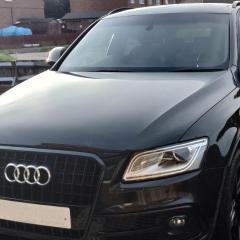
Had my new (to me) Q5 for a couple of months now and thought I'd sign up having found forums very useful with my previous cars.

2015 Q5 Mk1 facelift with a 3.0TDi S-Line Plus.....

Still learning lots as this is my first Audi after spending the last 9 years with a Mk4 Ford Mondeo 2.5t, but I have managed to make a few modifications to her already including -

OBDEleven module so I've activated Drive Select with additional modes, fog/cornering lights and gauge sweep.

Interior LED light swap.
Carplay unit from AliExpress so I can have Android Auto again.
Front and Reversing camera's which link into the above unit.
Rear armrest from a Q7 so I could get the integrated cup holders, was surprised it was a direct swap.
Retrofitted footwell lights front and rear.
Retrofitted the active door warning lights and puddle lights.
Nice set of alloy pedal covers that match the Mrs' Skoda Enyaq's.
RamAir airfilter.
Botslab G980H front and rear dashcam from Amazon.
And an adjustable dipstick as I'm stuck in my ways image.gif.f13a755576016fe90c2c8b9064f32410.gif😁

My Q5.jpg

Create an account or sign in to comment


Background Picker
Customize Layout

Account

Navigation

Search

Search

Configure browser push notifications

Chrome (Android)
  1. Tap the lock icon next to the address bar.
  2. Tap Permissions → Notifications.
  3. Adjust your preference.
Chrome (Desktop)
  1. Click the padlock icon in the address bar.
  2. Select Site settings.
  3. Find Notifications and adjust your preference.