




Skip to content
View in the app

A better way to browse. Learn more.

Audi Owners Club (UK)

A full-screen app on your home screen with push notifications, badges and more.

To install this app on iOS and iPadOS
  1. Tap the Share icon in Safari
  2. Scroll the menu and tap Add to Home Screen.
  3. Tap Add in the top-right corner.
To install this app on Android
  1. Tap the 3-dot menu (⋮) in the top-right corner of the browser.
  2. Tap Add to Home screen or Install app.
  3. Confirm by tapping Install.


Welcome to the Audi Owners' Club - An Independent community!

Membership is completely free, and our community is built by enthusiasts, for enthusiasts. We’re a proudly independentnon-official club, so all the help and opinions you’ll find here come directly from members with real experience of Audi ownership.

Join the club now!
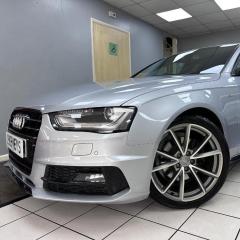
 

OMG what a day

Featured Replies

well i thought i would treat myself to a stage 1 map on my  a4  . well where to start i got the car 3 weeks ago from www.harveyscarcentre.co.uk it had 50k on clock so asked for cambelt / water plump to be done and breaks were low . and also had an adblue prob . was told they would fix all bits befor i picked it up . happy dayz  . or maybe not . ive been diving the car for 3 weeks all seemed fine .dropped in to mates garage for him to scan for codes all was looking good so i thought lets get a stage 1 . re map man come out today to map the car and in doing that that adblue prob came back. as in harveys car center had mapped it out and not fixed the adblue prob at all. i dont know what to do at this point i rang them today to kick off . but the big boss was not there till monday hmmmm 😞 .  the car said it only had 35 miles till shut down . ive had to pay for the map and £100 to re delete  adblue just so i could use it again .    its !Removed! me off as payed 14k for the car . and now im unsure how to deal with it 

IMG-20250114-WA0002.jpg

Create an account or sign in to comment


Background Picker
Customize Layout

Account

Navigation

Search

Search

Configure browser push notifications

Chrome (Android)
  1. Tap the lock icon next to the address bar.
  2. Tap Permissions → Notifications.
  3. Adjust your preference.
Chrome (Desktop)
  1. Click the padlock icon in the address bar.
  2. Select Site settings.
  3. Find Notifications and adjust your preference.